Showing posts with label gtk3. Show all posts
Showing posts with label gtk3. Show all posts
Tuesday, October 27, 2015
Spice Up Your Linux Desktop With The Moka Project GTK / Icon Themes
Many of you are probably already familiar with the Moka Project but, since I never covered it, and the project has evolved a lot recently, I though I'd write an article about it now.
 |
| Stark Ceru GTK theme / Faba Ceru icon theme in Unity (Ubuntu 14.04) |
Moka started as a single icon theme but it has evolved into an entire project which includes multiple GTK and icon themes for the Linux desktop as well as icon themes for Android, all designed / developed by +Sam Hewitt.
Currently, the Moka Project consists of 3 beautiful GTK themes (Moka, Orchis and Stark) and 3 icon themes (Moka, Faba and Faba Colors) for Linux desktops, accompanied by a GNOME Shell and a Plank theme.
Here are a few screenshots with some of the GTK / icon themes included in the Moka Project:
 |
| Moka Icon Theme |
 |
| Faba Colors |
To allow you to choose from 6 different folder colors, there's a supplementary theme to Faba called Faba Colors (along with Faba Light/Dark) which you can see above. Faba Color matches the Stark GTK theme, which is available in the same color variations:
 |
| Stark GTK theme |
Below you can see some of the Moka Project GTK / icon themes in action:
 |
| Orchis GTK theme / Moka icon theme in GNOME Shell |
 |
| Orchis GTK theme / Faba Roja icon theme in Unity |
 |
| Moka GTK theme / Faba Viol icon theme in Unity |
 |
| Moka GTK3 |
 |
| Orchis GTK3 |
 |
| Stark Lutu GTK3 |
 |
| Stark Roja GTK3 |
 |
| Stark Verd GTK3 |
 |
| Moka GNOME Shell theme |

It's also worth mentioning that according to Sam Hewitt, Orchis is the main project GTK theme, and not Moka, as you would expect. Moka GTK theme is still maintained though.
Download the Moka Project GTK / icon themes
All the Moka Project GTK / icon themes are available in repositories for Ubuntu / Linux Mint (Launchpad PPA), Fedora, openSUSE and Arch Linux (AUR).
The themes are free to download but there's also an option to donate to help its development and for this reason, I won't add installation instructions here. Instead, head over to the Moka Project website:

... and simply click the theme you want to install, then click the Download button and follow the instructions.
To change the GTK / icon theme, use a tool such as Unity Tweak Tool, GNOME Tweak Tool, Ubuntu Tweak, etc.
... and simply click the theme you want to install, then click the Download button and follow the instructions.
To change the GTK / icon theme, use a tool such as Unity Tweak Tool, GNOME Tweak Tool, Ubuntu Tweak, etc.
Important note: the Moka Project website doesn't mention the GTK version required by the GTK themes. I've tested the GTK themes with Ubuntu 12.04 (which uses GTK 3.4) and the themes looked broken so I assume the GTK themes require at least GTK 3.6 (the themes seemed to look ok in my brief Ubuntu 12.10 / GTK 3.6 test).
Report any bugs you may find @ GitHub.
some images via Moka Project

Monday, October 26, 2015
How To Disable GTK3 Client-Side Decorations (Header Bars)
Starting with GNOME 3.10, some GNOME applications have switched to "header bars" or "client-side decorations". These CSD (client-side decorations) don't work properly in some desktop environments / shells - for instance, in Ubuntu 14.04, Unity doesn't support CSD and because of this, some applications look broken. Luckily, there is now a relatively easy way (unofficial) of disabling client-side decorations. Read on!

In Ubuntu, Nautilus and a few other GNOME apps are patched so they don't use client-side decorations under Unity. However, not all applications were fixed - here are a few examples:
 |
| GNOME Clocks |
 |
| Latest gThumb 3.3.2 (gThumb from the Ubuntu repositories was downgraded when the Ubuntu devs noticed it's using CSD) |
 |
| GNOME Maps |
PCMan, one of the LXDE founders, has created gtk3-nocsd, a small module which can be used to disable the GTK+3 client-side decorations. gtk3-nocsd can achieves this by letting GTK think there's no compositor available, in which case the CSD fail to start.
Update: gtk3-nocsd works with GTK3 older than version 3.16.1 or newer than version 3.17.3. That means it's compatible with Ubuntu 14.04 and 15.04 but not with the latest Ubuntu 15.10.
Update: gtk3-nocsd works with GTK3 older than version 3.16.1 or newer than version 3.17.3. That means it's compatible with Ubuntu 14.04 and 15.04 but not with the latest Ubuntu 15.10.
Here are the same 3 applications as above, with gtk3-nocsd (so with disabled client-side decorations), under Ubuntu 14.04 LTS:


Update: Here's gThumb and GNOME Weather using the latest gtk3-nocsd under Unity (as you'll notice, there's no CSD close button any more, like in the screenshots above):

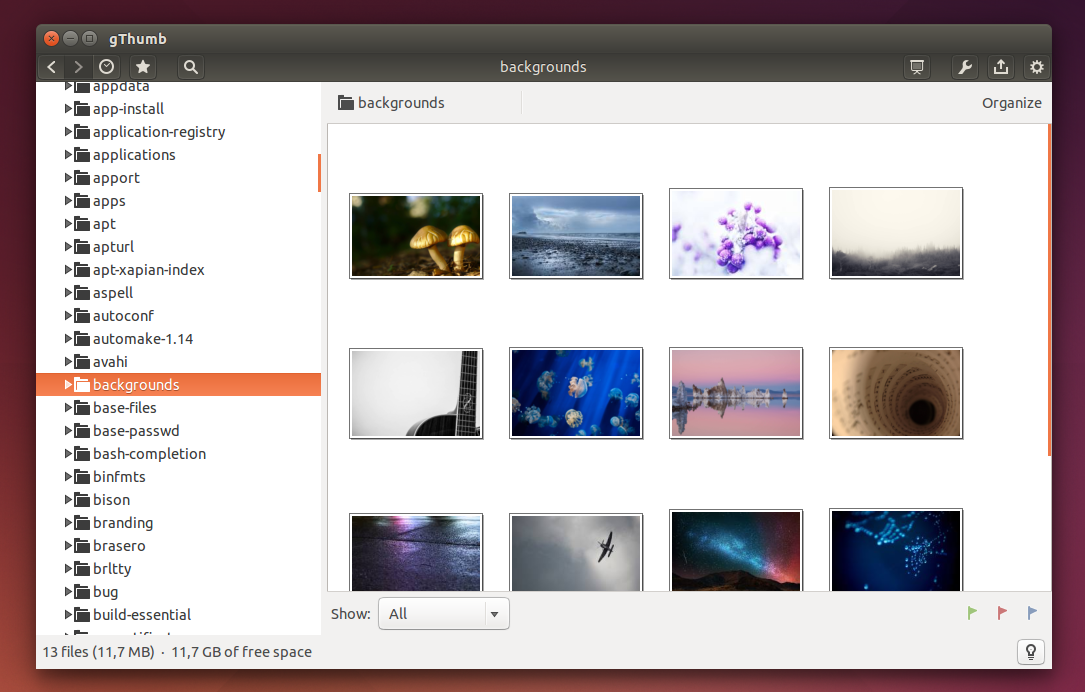
Install gtk3-nocsd
Ubuntu 14.04 or 15.04 users can install gtk3-nocsd by using the main failsdownloads PPA. To add the PPA and install gtk3-nocsd, use the following commands:
sudo add-apt-repository ppa:nilarimogard/failsdownloads
sudo apt-get update
sudo apt-get install gtk3-nocsd
Or, if you don't want to add the PPA, download the gtk3-nocsd deb from HERE.
Other Linux distributions: grab the gtk3-nocsd code from GitHub, make sure pkg-config and gtk+3-dev are installed and compile it using "make".
Simply installing gtk3-nocsd won't disable the GTK3 client-side decorations. See the example below for how to use it.
Disable GTK3 client-side decorations using gtk3-nocsd (example)
To be able to use gtk3-nocsd, you need to preload the gtk3-nocsd.so file (which is installed under /usr/lib/gtk3-nocsd/ if you've used the Ubuntu PPA mentioned above) using LD_PRELOAD.
Update: for the latest version, the file is now called "libgtk3-nocsd.so.0" however, the PPA package continues to use the old filename (gtk3-nocsd.so) for compatibility purposes.
You can disable GTK3 client side decorations in two ways: either loading it in your ~/.bashrc or ~/.profile, which means that gtk3-nocsd will be used globally (but for your user only), without having to modify anything else, or you can use it for specific applications only.
A. To use gtk3-nocsd globally (for all applications but for your user only), open ~/.profile with a text editor - I'll use Gedit below:
gedit ~/.profileexport GTK_CSD=0
export LD_PRELOAD=/usr/lib/gtk3-nocsd/gtk3-nocsd.soThen save the file, restart the session (log out) and that's it!
B. To use gtk3-nocsd with specific applications, you'll need to open the application .desktop file with a text editor and add "env LD_PRELOAD=/usr/lib/gtk3-nocsd/gtk3-nocsd.so" (without the quotes) to the Exec line, just after "=".
Here's an example: to disable the client-side decorations for gThumb 3.3.2, open its desktop file as root with a text editor (I'll use Gedit below):
gksu gedit /usr/share/applications/gthumb.desktopAnd in this file, search for the line that starts with "Exec=" and right after "=" and before "gthumb", add the following (without removing anything!):
env LD_PRELOAD=/usr/lib/gtk3-nocsd/gtk3-nocsd.soAfter editing gthumb.desktop, the "Exec=" line should look like this:
Exec=env LD_PRELOAD=/usr/lib/gtk3-nocsd/gtk3-nocsd.so gthumb %UIn the same way you can disable client-side decorations for any application you want: GNOME Clocks, GNOME Maps, etc.
Tuesday, October 6, 2015
Audacious Switches Back To GTK2, Adds New Qt-Based User Interface [Audacious 3.6 Alpha 1]
Audacious is a fast audio player that focuses on high audio quality and low resource usage, which comes with a pretty large plugin list and until now, it shipped with two interfaces: a GTK+ interface and a Winamp 2.x like interface (and so, it supports Winamp 2.x skins).
As we pointed out a while back, the Audacious developers aren't very happy with GTK3 and for the latest Audacious 3.6 alpha 1, released recently, they've switched back to GTK2 by default.
Also, since the long-term goal is to completely switch to Qt, Audacious 3.6 alpha 1 includes a new Qt5-based user interface which is already usable, but not as feature-rich as the GTK+ interface. The new Qt interface can be installed alongside the already existing GTK+ and Winamp Classic interfaces.
Also, since the long-term goal is to completely switch to Qt, Audacious 3.6 alpha 1 includes a new Qt5-based user interface which is already usable, but not as feature-rich as the GTK+ interface. The new Qt interface can be installed alongside the already existing GTK+ and Winamp Classic interfaces.
 |
| Audacious 3.6 alpha 1 - GTK2 interface |
 |
| Audacious 3.6 alpha 1 - Qt interface |
For those who prefer GTK3, there's a separate Audacious 3.6 alpha 1 GTK3 tarball available for download but, unless the developers have changed their mind, Audacious 3.6 might be the last release to support GTK3.
Besides these UI changes, the latest Audacious 3.6 alpha 1 also ships with quite a new features and improvements:
- support double-size scaling of Winamp skins;
- it's now possible to search by genre in the search tool plugin;
- the playlist manager can be docked in the GTK+ interface;
- crossfading on seek and manual song change;
- support for “album artist” in song tags;
- search results are filtered by number of songs in the search tool plugin;
- cue files are now automatically added to playlists and to the library;
- adjustable HTTP buffer size;
- optional calculation of a more accurate song length estimate for MP3 files
- optional skipping of leading and trailing silence in MIDI files;
- restored settings dialog for the SID plugin;
- Audacious can now be built as a headless music player “daemon” with no GTK+ dependency (some plugins still require GTK+ though);
- by default, playback now resumes in a paused state upon startup;
- window positions of visualization plugins and of the search tool are now saved and restored at startup when the Winamp Classic interface is used;
- there is a new effect plugin to remove leading and trailing silence in any song file;
- new controls have been added to the song information dialog to allow tagging entire albums without retyping the artist and album name for each song;
- a new option has been added to probe content of files with no recognized filename extension. With this option enabled, files with no extension can be added to playlists and to the library automatically, and subtunes in those files will also be recognized. The extra probing does slow Audacious down, so enable the option only if needed;
- support for the SID song lengths database has been restored;
- the ALSA output plugin now checks for new devices when the settings dialog is opened, so it’s no longer necessary to restart Audacious after plugging in a USB audio device;
- the JACK and sndio output plugins have been rewritten from scratch in order to fix a number of problems;
- more.
Audacious 3.6 is still in alpha, so if you plan on giving it a try, keep in mind that you might find incomplete of broken features. For instance, the Qt interface currently displays some text in English only and the Qt interface playlist editor has limited capabilities for now.
Test Audacious 3.6 alpha 1 in Ubuntu 14.04 or 14.10
Ubuntu 14.04 or 14.10 (and derivatives) users can try the latest Audacious 3.6 alpha by using the failsdownloads Unstable PPA. The packages in this PPA are for testing purposes only. It's also important to mention that Audacious from this PPA has been built with both GTK2 and Qt interfaces enabled.
To install Audacious 3.6 alpha 1 for testing, use the following commands:
sudo add-apt-repository ppa:failsdownloadsteam/unstable
sudo apt-get update
sudo apt-get install audacious
By default, launching Audacious from the menu / Unity Dash, the app will use the GTK2 interface and changing the interface to Qt from the Audacious settings doesn't work. To run Audacious with the Qt interface, you must use the following command:
audacious --qtIf later on you want to revert the changes and downgrade Audacious to the stable version available in the official Ubuntu repositories (or the main failsdownloads PPA), purge the failsdownloads Unstable PPA using the following commands:
sudo apt-get install ppa-purge
sudo ppa-purge ppa:failsdownloadsteam/unstable
If you don't want to add the PPA or you're not using Ubuntu, you can download the latest Audacious 3.6 alpha 1 source from its website.
GTK 3.10 Lands In Ubuntu 14.04 Trusty Tahr

Despite Sebastien Bacher's (software engineer at Canonical) initial proposal to stay on GTK 3.8 for Ubuntu 14.04 LTS, GTK 3.10 landed in the Ubuntu 14.04 Trusty Tahr proposed repositories.
According to an Ubuntu Desktop mailing list message, the rationale behind updating GTK to version 3.10 in Ubuntu 14.04 is to make "app developers happier (and we expect some of them to want to stay on the LTS for some time), and unblock some work for Ubuntu GNOME" and also, this should "bring performance improvement to our Unity menus".
In the same message, Sebastien Bacher explains that Canonical plans to fork gnome-settings-daemon and gnome-control-center for Unity 7 (see: Unity Control Center @ Launchpad) and stay on the current version for Trusty - if that happens, it would benefit Ubuntu GNOME which could ship with the latest GSD/GCC.

Furthermore, for Ubuntu 14.04 Trusty Tahr, Canonical wants to add menubars back to GNOME applications that no longer use a traditional style menubar in recent versions, such as Nautilus, Evince, GNOME Calculator and so on: "the plan is to upstream those patches, and to make the menubar be displayed in a conditional way depending of the environment, that's what is done already in Gedit". The developers are also looking for a way to get client side decorations apps to look more consistent, like adding the window manager decorations back and hiding the close button for example.
That got me thinking that we could get GNOME 3.10 apps in Ubuntu 14.04 but in a recent message, Sebastien Bacher explains that only 3.10 applications that bring mostly bug fixes and no UI redesign can land in Trusty:
"Yes, we really want the UI consistency/working menus for the LTS. I'm not sure about 3.10, I've looked at those and we did a few selected updates for components which bring mostly bug fixes and no UI redesign. I doubt we are going to take apps using GtkHeaderBar this cycle though, those need more integration work".
Subscribe to:
Posts (Atom)