Showing posts with label deb. Show all posts
Showing posts with label deb. Show all posts
Tuesday, October 6, 2015
PeaZip 5.6.1 is released, Install on Ubuntu and Linux Mint

Install PeaZip 5.6.1 on Ubuntu 15.04 vivid Vervet, ubuntu 14.10 Utopic Unicorn, Ubuntu 14.04 Trusty Tahr (LTS) and Linux Mint 17.1 Rebecca, Linux Mint 17 Qiana
PeaZip is a free archiver tool. The application provides an unified, natively portable, cross-platform file manager and archive manager GUI for many Open Source technologies like 7-Zip, FreeArc, PAQ, UPX.
Create: 7Z, ARC, BZip/GZip, PEA, TAR, WIM, XZ, ZPAQ, ZIP files and more
Open and extract 150+ file types: ACE, CAB, DEB, ISO, RAR, ZIPX and more
Features of PeaZip includes extract, create and convert multiple archives at once, create self-extracting archives (sfx), split files, strong encryption with two factor authentication, encrypted password manager, secure deletion, find duplicate files, calculate hashes, export task definition as command line script.
Features
- Compress to 7Z, ARC, BZ2, GZ, PAQ/ZPAQ, PEA, QUAD/BALZ, sfx, TAR, WIM, XZ, ZIP file format
- Open and extract over 150 archive types, including ACE, ISO, RAR, UDF, ZIPX files
- Archive management: extract, create and convert multiple archives at once, create sfx archives, split and merge files, save job definition as script
- File management: advanced search, navigation and bookmarking features, find duplicate files, calculate checksums and hashes
- Security: strong encryption with two factor authentication (with optional key file), password manager (with optional strong encryption protection), secure deletion
- Available both for Windows and Linux in portable and installable version
Download for Ubuntu 32 bit
Download for Ubuntu 64 bit
The source is available now. Binary packages are in the process of being built, and will appear soon at their respective download locations.

Angry IP Scanner 3.3.3 Released, Install on Ubuntu, Debian, Linux Mint, Fedora, OpenSUSE, Mageia and REDHAT

Angry IP Scanner 3.3.3 Released, Install on Ubuntu 15.04 vivid Vervet, ubuntu 14.10 Utopic Unicorn, Ubuntu 14.04 Trusty Tahr (LTS), Debian 8 "jessie", Debian 7 "wheezy", Linux Mint 17.2 Rafaela, Linux Mint 17.1 Rebecca, Linux Mint 17 Qiana, Fedora 22, Fedora 21, OpenSUSE 13.2, OpenSUSE 13.1, Mageia 5, Mageia 4 and REDHAT
Angry IP Scanner (or simply ipscan) is an open-source and cross-platform network scanner designed to be fast and simple to use. It scans IP addresses and ports as well as has many other features.
It is widely used by network administrators and just curious users around the world, including large and small enterprises, banks, and government agencies. It runs on Linux, Mac OS X, Windows and possibly supporting other platforms as well.
Download version 3.3.3 below or browse all 3.x releases
For 64 bit :
For 32 bit :
In case “dpkg” indicates missing dependencies, complete the installation by executing the following command:
For OpenSUSE 64 bit :
Running
Make sure you have Oracle Java or OpenJDK installed - check your distribution. GCJ is not recommended.
DEB and RPM packages will install appropriate 'desktop' files, so Angry IP Scanner will appear in the applications menu, under either Internet or Networking. Alternatively, you can just type
Jar files are launched by either double-clicking or typing
The source is available now. Binary packages are in the process of being built, and will appear soon at their respective download locations.
- DEB Package for Ubuntu/Debian/Mint, 64-bit
- RPM Package for Fedora/RedHat/Mageia/openSUSE, 64-bit
- DEB Package for Ubuntu/Debian/Mint, 32-bit
- RPM Package for Fedora/RedHat/Mageia/openSUSE, 32-bit
Install Angry IP Scanner 3.3.3 on Ubuntu / Debian / Linux Mint :
To Install/Update Angry IP Scanner 3.3.3 on Ubuntu 15.04 vivid Vervet, ubuntu 14.10 Utopic Unicorn, Ubuntu 14.04 Trusty Tahr (LTS), Ubuntu 13.10/13.04/12.04, Linux Mint 17.2 Rafaela, Linux Mint 17.1 Rebecca, Linux Mint 17 Qiana, Linux Mint 13 Maya, Pinguy OS 14.04, Elementary OS 0.3 Freya, Elementary OS 0.2 Luna, Peppermint Five, Deepin 2014, LXLE 14.04, Linux Lite 2.0, Linux Lite 2.2 and other Ubuntu derivative systems, open a new Terminal window and bash (get it?) in the following commands:For 64 bit :
$ sudo apt-get install openjdk-7-jdk ant rpm wine
$ sudo wget http://github.com/angryziber/ipscan/releases/download/3.3.3/ipscan_3.3.3_amd64.deb
$ sudo dpkg -i ipscan_3.3.3_amd64.deb
For 32 bit :
$ sudo apt-get install openjdk-7-jdk ant rpm wine
$ wget http://github.com/angryziber/ipscan/releases/download/3.3.3/ipscan_3.3.3_i386.deb
$ sudo dpkg -i ipscan_3.3.3_i386.deb
In case “dpkg” indicates missing dependencies, complete the installation by executing the following command:
$ sudo apt-get install -f
Install Angry IP Scanner 3.3.3 on Fedora / Mageia / OpenSUSE / REDHAT :
To Install/Update Angry IP Scanner 3.3.3 on Fedora 22, Fedora 21, OpenSUSE 13.2, OpenSUSE 13.1, Mageia 5, Mageia 4 and REDHAT derivative systems, open a new Terminal window and bash (get it?) in the following commands:For OpenSUSE 64 bit :
$ wget http://github.com/angryziber/ipscan/releases/download/3.3.3/ipscan-3.3.3-1.x86_64.rpmFor OpenSUSE 32 bit :
$ sudo zypper install ipscan-3.3.3-1.x86_64.rpm
$ wget http://github.com/angryziber/ipscan/releases/download/3.3.3/ipscan-3.3.3-1.i386.rpmFedora 64 bit :
$ sudo zypper install ipscan-3.3.3-1.i386.rpm
$ wget http://github.com/angryziber/ipscan/releases/download/3.3.3/ipscan-3.3.3-1.x86_64.rpmFedora 32 bit :
$ sudo yum install ipscan-3.3.3-1.x86_64.rpm
$ wget http://github.com/angryziber/ipscan/releases/download/3.3.3/ipscan-3.3.3-1.i386.rpm
$ sudo yum install ipscan-3.3.3-1.i386.rpm
Running
Make sure you have Oracle Java or OpenJDK installed - check your distribution. GCJ is not recommended.
DEB and RPM packages will install appropriate 'desktop' files, so Angry IP Scanner will appear in the applications menu, under either Internet or Networking. Alternatively, you can just type
ipscan to launch the application.Jar files are launched by either double-clicking or typing
java -jar jar-file.The source is available now. Binary packages are in the process of being built, and will appear soon at their respective download locations.
Kodi 14.0 Helix Released, Install on Linux mint and ubuntu derivative system via PPA

Kodi 14.0 Helix Released, Install on Linux mint and ubuntu derivative system via PPA
Kodi (formerly XBMC Media Center) is an open source and very powerful project that provides all the necessary tools for transforming your regular PC into a bona fide HTPC, which if used in conjunction a big screen TV and a Hi-Fi audio system, will transform your living room into a veritable home theater.
Kodi 14.0 Helix Changes :
Below we will give a snapshot of the most important fixes done since the first release candidate.
* Bump FFmpeg to 2.4.4
* Fix problem with setting content on new and existing video sources
* Fix spinner in video settings for choosing hardware or software decoding
* Fix recording history in PVR
* Separate sort order in PVR window for each directory
* Fix PVR preview video scaling for AMLCodec on Android
* Fix restart option on Win 8.1
* Fix crashes on certain Intel GPU when playing video
* Fix crashes on certain videos on Android 5.0 devices (Nexus Player and ADT-1)
* Fix LPCM (audio/L16) streaming via UPnP
* Use correct art type when appending art to item lists
* Fix python PIL package on Windows that caused crash on weather add-on
* Updated GUI translation files
Features at a glance
Key features include powerful media management capabilities, a fluid Interface, plug-ins that allow for great extensibility, cinematic effects and visualizations, built-in multimedia codecs, themes, and much more. The application can play your entire collection of music files, supporting all the popular formats like MP3, FLAC, WAV, WMA or OGG. It also provides support for cue sheets, audio tagging and smart playlists.
Your entire video collection can also be played by Kodi, supporting all the major video formats like AVI, MP4, DivX, XviD, DVD Video, MKV, and many more. In addition, it includes support for Internet streams. The program provides support for organizing and viewing your favorite TV shows, which will be sorted by episodes and seasons. Moreover, Kodi can be used to display an entire collection of digital photos.
Your entire video collection can also be played by Kodi, supporting all the major video formats like AVI, MP4, DivX, XviD, DVD Video, MKV, and many more. In addition, it includes support for Internet streams. The program provides support for organizing and viewing your favorite TV shows, which will be sorted by episodes and seasons. Moreover, Kodi can be used to display an entire collection of digital photos.
To Install on Linux Ubuntu (13.04, 13.10, 15.04 Vivid Vervet, Ubuntu 14.10 Utopic Unicorn, Ubuntu 14.04 Trusty Tahr), Linux Mint 17.1 Rebecca, Linux Mint 17 Qiana, Linux Mint 13 Maya, Pinguy OS 14.04, Elementary OS 0.3 Freya, Elementary OS 0.2 Luna, Peppermint Five, Deepin 2014, LXLE 14.04, Linux Lite 2.0 and other Ubuntu derivative systems via PPA, Use the command line terminal and enter the following commands. Follow the prompts as you would any other software installation :
Stable PPA
sudo apt-get install python-software-properties pkg-config
sudo apt-get install software-properties-common
sudo add-apt-repository ppa:team-xbmc/ppa
sudo apt-get update
sudo apt-get install kodiUnStable PPA
sudo apt-get install python-software-properties pkg-config
sudo apt-get install software-properties-common
sudo add-apt-repository ppa:team-xbmc/unstable
sudo apt-get update
sudo apt-get install kodi
Optional, to remove kodi, open a new Terminal window and bash (get it?) in the following commands:
sudo apt-get remove kodiOur hope tutorial entitled "Install Kodi 14.0 Beta 2 in Linux Mint 17 Ubuntu 14.10, Ubuntu 14.04, Ubuntu 12.04 based distro via PPA" can be useful for visitors.
Install/Update KDE Plasma 5.3.1 on Ubuntu, Debian, OpenSUSE, Fedora and Arch Linux
KDE Plasma 5.3.1 is out, Now you can install KDE Plasma 5.3.1 on (K)Ubuntu, Debian, OpenSUSE, Fedora and Arch Linux
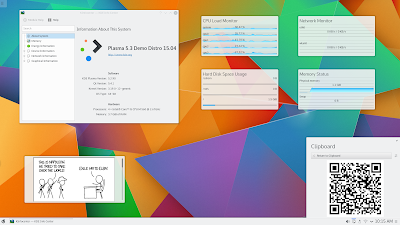
KDE Plasma (formerly K Desktop Environment and KDE Software Compilation and KDE Plasma Workspace and Applications) is an open source project comprised of numerous packages, libraries and applications designed to provide a modern graphical desktop environment for Linux and UNIX-like workstations.
What New in KDE Plasma 5.3.1:
A beautiful, modern and traditional desktop environment
It combines ease-of-use, superior graphical design and powerful functionality with the unique features and architecture of the Linux operating system. It’s comprised of the KDE Plasma Workspaces and KDE Applications components.
Additionally, it contains extra add-on for the panel and desktop, a download manager, an instant messenger, an addressbook, a document viewer, a multimedia layer called Phonon (similar to GStreamer on GNOME), and accessibility functionality, such as a powerful text-to-speech system.
to Install/Update KDE Plasma 5.3.1 on Fedora and other Fedora derivative systems, open a new Terminal window and bash (get it?) in the following commands:
to Install/Update KDE Plasma 5.3.1 on Arch Linux and other Arch Linux derivative systems, open a new Terminal window and bash (get it?) in the following commands:
Arch Linux: All the dependencies used for building frameworks can be installed by running:
Enjoy! I hope this article adding you more clarity.
Read more »

KDE Plasma (formerly K Desktop Environment and KDE Software Compilation and KDE Plasma Workspace and Applications) is an open source project comprised of numerous packages, libraries and applications designed to provide a modern graphical desktop environment for Linux and UNIX-like workstations.
What New in KDE Plasma 5.3.1:
- Bluedevil
- Fileitemactionplugin: Don't use blocking DBus calls. Commit. Fixes bug #347113
- Applet: Fix showing incorrect device name in connect failed notification. Commit.
- Update pin-code-database.xml. Commit.
- bluez-qt
- Don't ignore interface name in DBus properties changed signal. Commit.
- Breeze
- Cleanup tests in scrollarea event filter. Commit. Fixes bug #347971
- Default to Qt::AlignVCenter (instead of Qt::AlignTop) when vertical alignment flag is not set. Commit. See bug #346679
- Make sure iconSize is valid before rendering. Commit.
- Sanitize button positioning. Commit.
- Pass iconSize as button's parameter rather than trying to calculate it from geometry and offset. Commit.
- Implement SH_ItemView_ActivateItemOnSingleClick in kde4. Commit.
- Build on ARM. Commit.
- Plasma Addons
- DateTimeRunner: Fix off by 1 error. Commit. Fixes bug #346021
- Kimpanel: fix window position when coordinate is outside screen. Commit.
- KInfoCenter
- Extract messages from Modules/base into the catalog kcminfo. Commit. Code review #123864
- KIO Extras
- Don't mangle UDS_TARGET_URL to UDS_LOCAL_PATH in UDSEntries. Commit. Code review #123781
- KWin
- Fix presentwindows crash on disabling closebuttons. Commit. Code review #123865
- No VBO upload for zero vertex count. Commit. Fixes bug #347900. Code review #123865
- [effects] Fix loading of trackmouse effect textures. Commit. Code review #123862
- Show Desktop: activateNextClient prefers desktop. Commit. Code review #123783. See bug #346837. See bug #346933. See bug #347212
- Show Desktop: break state with activation (only). Commit. Code review #123783. See bug #346837. See bug #346933. See bug #347212
- Show Desktop: keep desktop group visible. Commit. Code review #123783. See bug #346837. See bug #346933. See bug #347212
- Showing Desktop: keep docks visible. Commit. Code review #123783. Fixes bug #346933. Fixes bug #347212. See bug #346837
- Fix CM reselection. Commit. Fixes bug #347813. Code review #123826
- Lazy setting of xbc properties on qApp. Commit. See bug #346748. Code review #123777
- Stall wobbling while screen is transformed. Commit. Code review #123733. Fixes bug #338972
- Ignore elevation list while screen is locked. Commit. Fixes bug #347466
- Prefer query Screens::refreshRate(). Commit. Fixes bug #347360. Code review #123693
- Add Screens::name(int screen); STUB but for XRandr. Commit.
- Add OutputInfo class to obtain output names. Commit.
- Add refreshRate to Screens. STUB but for XRandr!. Commit.
- Forward resource modes next to crtcs. Commit.
- Desk grid: do not recreate DesktopButtonsViews. Commit. Fixes bug #347339. Code review #123668
- Make switchWindow FROM stickies act on current VD. Commit. Fixes bug #331512. Code review #123640
- UpdateXTime before sending a takeFocus message. Commit. Fixes bug #347153. Code review #123639
- Window aperture always needs to cancel. Commit. Fixes bug #347174. Code review #123636
- Do not switch desktop on resizing windows. Commit. Code review #123599
- Break desktopshowing state from cover & flipswitch. Commit. Code review #123550. See bug #346837
- libkscreen
- Handle backend being deleted during GetConfigOperation. Commit. Fixes bug #347626. Code review #123860
- BackendLauncher: delete and unload backends before returning from main(). Commit.
- XRandR: use intermediate screen size when applying config. Commit.
- Fix crash introduced in previous commit. Commit.
- Fix potential crash when running ConfigOperation in exec() mode. Commit. Fixes bug #346575
- Muon
- Make sure the apt notifier gets initialized. Commit.
- --debug. Commit.
- Polish Discover menu configuration. Commit.
- Improve display of the update button. Commit. Fixes bug #343210
- Use proper icon to identify updates. Commit.
- Only emit about found updates when they change. Commit. See bug #346622
- Oxygen
- Default to Qt::AlignVCenter (instead of Qt::AlignTop) when vertical alignment flag is not set CCBUG: 346679. Commit.
- Fix popup menu items getting stray highlighted. Commit. Fixes bug #332377. Code review #123807
- Implement SH_ItemView_ActivateItemOnSingleClick. Commit.
- Plasma Desktop
- Require xorg-evdev >= 2.8.99.1. Commit.
- Fix translation of strings in kcm/touchpad.kcfg. Commit.
- Fix toolbox positioning. Commit. Fixes bug #347857
- Abort window highlight effect before launching present windows. Commit. Fixes bug #347395
- Remove redundant proxy. Commit.
- Fix force stripes on vertical. Commit.
- Add FindEvdev cmake module. Commit. Fixes bug #347749. Code review #123808
- KAStats: Properly resetting model when clear is called. Commit.
- Fix reverse scroll in Mouse KCM. Commit.
- Don't close when emptying Recent* categories. Commit.
- Adjust margins in vertical panels as horizontal. Commit.
- Don't add menu actions twice. Commit.
- Fix 'Add to Desktop' against the Folder containment being unreliable. Commit.
- SQLite supports offset only of limit is specified. Commit.
- Clean up some debug junk. Commit.
- Keeping ResultSet open as little as possible and fixing the count limit. Commit.
- Grab on the right item; fixes regression from 1c38100f while retaining the crash fix. Commit.
- Fix missing signal connect + some speed optimizations for KAMD submenu reveals. Commit.
- Fix race condition between PlacesModel and deriving URL from UI state. Commit.
- Use TextMetrics for lower bound. Commit.
- Ignore press events on scrollbars and make sure smooth scroll is disabled when not autoscrolling. Commit.
- Improve visibility of running widget checkmark. Commit. Code review #123539. Fixes bug #342112
- KActivitiesStats: Obey the item count limit for the ResultModel. Commit.
- Remove use of KCoreAddons.Format; KDirModel now returns preformatted data. Commit. Fixes bug #346567
- Plasma Media Center
- Use correct header for used class. Commit.
- Plasma Networkmanager (plasma-nm)
- Fix typo in END_TLS_AUTH_TAG. Commit. Fixes bug #347416
- Drop WiMAX support for NM 1.2.0+. Commit. Code review #123657
- Editor: request secrets when "secretkey-flags" is not present in setting. Commit.
- Add option to show/hide menu bar. Commit. Fixes bug #347141
- Plasma Workspace
- [libtaskmanager] Use windowClass from KWindowInfo instead fetching from X each time. Commit. See bug #340583
- Adjust the one pixel gap for right aligned panels. Commit. Fixes bug #347873
- Process updates scripts even after we load the default layout. Commit.
- Enable translations for devicenotifications dataengine. Commit. Code review #123846
- Add missing TRANSLATION_DOMAIN for dataengines keystate, network, rss, weather. Commit. Code review #123854
- Default to desktop sorting. Commit.
- ++paranoia;. Commit.
- [notifications] Make notifications work properly with --reverse. Commit. Code review #122648. Fixes bug #343251
- [notifications] Clip the NotificationItem to prevent painting outside of its rect. Commit. Fixes bug #346419
- [digital-clock] Add timezone filtering by region too. Commit. Code review #123740. Fixes bug #346681
- [klipper] Ensure global shortcut actions work. Commit. Fixes bug #345945. Code review #123727
- Guard access to kscreen configuration. Commit. Fixes bug #346590. Code review #123648CHANGELOGCHANGELOG:Fix crash on Plasma startup caused by a race condition
- [digital-clock] Use KCMShell.open for the formats KCM. Commit. Fixes bug #347032
- Make ConfigFile() reuse the Corona's KSharedConfigPtr when its config file is requested. Commit.
- Fix second arg not being used when parent is a ConfigGroup. Commit.
- [digital-clock] Fix missing function return. Commit.
- [digital-clock] Change the id of the root item. Commit. Fixes bug #346841
- When switching activities, use only the running ones. Commit. Fixes bug #347029. Code review #123597
- [notifications] Clear notification from show queue if it's closed before it's shown. Commit. Fixes bug #342605
- [notifications] Always check first if the dispatch timer isn't running already. Commit. See bug #342605
- Fix a crash in PowermanagementEngine::populateApplicationData when the given name is empty. Commit. Code review #123555
- Check for model existence. Commit. Fixes bug #346870
- Only restart Timer when the dialog is visible. Commit.
- Fix running applet calculation. Commit.
- Manually keep track of jobs sources. Commit. Code review #123502. Fixes bug #346673
- Match window switch dialog borders with addwidgets/switch activity. Commit. Fixes bug #345614. Code review #123506
- [notifications] Replace ' with ' as ' is not supported by StyledText. Commit. Fixes bug #346710
- Disable indeterminate animation for suspended jobs. Commit.
- Fix last commit. Commit.
- Fix logic in argument check in plasma-windowed. Commit. Fixes bug #346311
- Powerdevil
- Consider overall percentage when emitting battery warning on startup. Commit. Code review #123704. Fixes bug
A beautiful, modern and traditional desktop environment
It combines ease-of-use, superior graphical design and powerful functionality with the unique features and architecture of the Linux operating system. It’s comprised of the KDE Plasma Workspaces and KDE Applications components.
Additionally, it contains extra add-on for the panel and desktop, a download manager, an instant messenger, an addressbook, a document viewer, a multimedia layer called Phonon (similar to GStreamer on GNOME), and accessibility functionality, such as a powerful text-to-speech system.
How to Install/Update KDE Plasma 5.3.1 on Ubuntu, Debian, OpenSUSE, Fedora and Arch Linux :
to Install/Update KDE Plasma 5.3.1 on (K)Ubuntu and Debian and other Debian derivative systems, open a new Terminal window and bash (get it?) in the following commands:$ sudo apt-get build-dep qtbase5-dev
$ sudo apt-get install libbz2-dev libxslt-dev libxml2-dev shared-mime-info oxygen-icon-theme libgif-dev libvlc-dev libvlccore-dev doxygen gperf bzr libxapian-dev fontforge libgcrypt20-dev libattr1-dev network-manager-dev libgtk-3-dev xsltproc xserver-xorg-dev xserver-xorg-input-synaptics-dev libpwquality-dev modemmanager-dev libxcb-keysyms1-dev libepoxy-dev libpolkit-agent-1-dev libnm-util-dev libnm-glib-dev libegl-mesa-dev libxcb-xkb-dev libqt5x11extras5-dev libwww-perl libxml-parser-perl libjson-perl libboost1.55-dev libgstreamer-plugins-base1.0-dev libgstreamer1.0-devto Install/Update KDE Plasma 5.3.1 on OpenSUSE and other Debian derivative systems, open a new Terminal window and bash (get it?) in the following commands:
$ sudo zypper si -d libqt5-qtbase
$ sudo zypper in libbz2-devel libxslt-devel libxml2-devel shared-mime-info oxygen-icon-theme giflib-devel vlc-devel doxygen gstreamer-0_10-devel gstreamer-0_10-plugins-base-devel docbook-xml-slides docbook-xsl-stylesheets xcb-util-keysyms-devel perl-JSON boost-devel libxcb-devel libXrender-devel xcb-util-wm-devel xcb-util-devel xcb-util-image-devel gettext-tools
$ sudo zypper in gtk3-devel # for kde-gtk-config
$ sudo zypper in grantlee5 # for kdevplatform
$ sudo zypper in libkdcraw-devel liblcms2-devel # for gwenviewOptional for kdeplasma-addons: libibus >=1.4.2 (see http://software.opensuse.org/package/libibus-1_0-5)
to Install/Update KDE Plasma 5.3.1 on Fedora and other Fedora derivative systems, open a new Terminal window and bash (get it?) in the following commands:
$ sudo yum-builddep qt phonon-backend-vlc phonon-backend-gstreamer
$ sudo yum install gcc-c++ ruby doxygen git bzr flex bison gperf socat boost-devel bzip2-devel libxslt-devel libxml2-devel shared-mime-info oxygen-icon-theme giflib-devel xcb-util-keysyms-devel perl-JSON perl-Pod-Usage "*xcb*-devel" perl-XML-Parser NetworkManager-glib-devel xapian-core-devel libxkbcommon-devel libxkbcommon-x11-devel systemd-devel libwayland-cursor-devel libwayland-server-devel libepoxy-devel gtk3-devel sane-backends-devel libattr-devel libcanberra-devel libusb-devel libxkbfile-devel fontforge-devel libical-devel gpgme-devel cyrus-sasl-devel openldap-devel libpwquality-devel polkit-devel
to Install/Update KDE Plasma 5.3.1 on Arch Linux and other Arch Linux derivative systems, open a new Terminal window and bash (get it?) in the following commands:
Arch Linux: All the dependencies used for building frameworks can be installed by running:
$ sudo pacman -Sy phonon-qt5 qt5-webkit qt5-script qt5-svg qt5-tools qt5-x11extras enchant jasper openexr libutempter docbook-xsl shared-mime-info giflib libxss upower udisks2 bzr git doxygen perl-json perl-libwww
$ <your_AUR_helper> kf5-akonadi-git
Enjoy! I hope this article adding you more clarity.
Kadu 1.5 released, install on debian, ubuntu/Linux Mint, OpenSUSE, Gentoo, Arch Linux, Mandriva and Mac OSX

Kadu 1.5 released, install on debian, ubuntu/Linux Mint, OpenSUSE, Gentoo, Arch Linux, Mandriva and Mac OSX
Kadu is an open source graphical software that provides users with a multi-protocol instant messaging solution for the Gadu-Gadu protocol. It supports GNU/Linux, Microsoft Windows and Mac OS X operating systems.
The application is fully functional, good-looking and fully compatible with the widely used Jabber/XMPP protocol. It offers a familiar, user-friendly, easy to use and flexible graphical interface.
What's New in This Release :
- otr: #2895 fixed: strange error messages when using libotr5-4.1.0 (Vogel)
- history: #2902 fixed: clear history menu item dissappears after a second (Vogel)
Among some of its major features, we can mention message encryption, file transfer support, graphical messages, emoticons, support for numerous plugins, easy and comprehensive configuration, as well as bot, annoyers and spammers protection.
However, its power consists of the numerous standard plugins maintained by the Kadu developers, as well as external add-ons created and maintained by users. They add support for SMS, MPD media players, Growl notifications, and much more.
Whether you want to encrypt your conversations, add sound support from external applications, set auto away messages, add custom notifications, add support for FALF media players, protect yourself against unwanted chats, or store chat history, you need a plugin.
Install Kadu 1.5 on Debian 8 "jessie" (upcoming), Debian 7 "wheezy", Debian 6 "squeeze", Kali linux 1.0.9, Kali Linux 1.0.8 (and old version 1.0.7, 1.0.6, 1.0.5), KNOPPIX, Kanotix, Astra Linux, Blankon Linux 9.0 suroboyo, Blankon Linux 8.0 rote , Blankon Linux 10.0 tambora (upcoming) and old version 7.0, Univention Corporate Server and debian derivative system :
You can use the terminal instead and, as root, run:
# apt-get install kaduInstall Kadu 1.5 onUbuntu 15.04 vivid Vervet, ubuntu 14.10 Utopic Unicorn, Ubuntu 14.04 Trusty Tahr (LTS), Ubuntu 13.10/13.04/12.04, Linux Mint 17.1 Rebecca, Linux Mint 17 Qiana, Linux Mint 13 Maya, Pinguy OS 14.04, Elementary OS 0.3 Freya, Elementary OS 0.2 Luna, Peppermint Five, Deepin 2014, LXLE 14.04, Linux Lite 2.0, Linux Lite 2.2 and other Ubuntu derivative systems via PPA :
sudo add-apt-repository ppa:patryk-prezu/ppa
sudo apt-get update
sudo apt-get install kadu
sudo apt-get install kadu-external-modules kadu-themes
Installation with YaST (OpenSUSE)
Open YaST → Software management and type kadu in search box. Then choose packages from the list and confirm changes with Accept button.
Installation with console
Login as root and install kadu typing:
suYou can also install additional packages so You can list them using:
zypper in kadu
zypper se kadu
For More information about intall kadu 1.5 on other linux distro you can read in this page.
good luck !
Unknown Horizons 2014.1 is out, you can install/Update on Ubuntu and Linux Mint via PPA

Unknown Horizons 2014.1 is out, you can install/Update on Ubuntu 15.04 vivid Vervet, ubuntu 14.10 Utopic Unicorn, Ubuntu 14.04 Trusty Tahr (LTS), Ubuntu 13.10/13.04/12.04, Linux Mint 17.1 Rebecca, Linux Mint 17 Qiana, Linux Mint 13 Maya, Pinguy OS 14.04, Elementary OS 0.3 Freya, Elementary OS 0.2 Luna, Peppermint Five, Deepin 2014, LXLE 14.04, Linux Lite 2.0, Linux Lite 2.2 and other Ubuntu derivative systems via PPA
Unknown Horizons is a 2D realtime strategy simulation with an emphasis on economy and city building. Expand your small settlement to a strong and wealthy colony, collect taxes and supply your inhabitants with valuable goods. Increase your power with a well balanced economy and with strategic trade and diplomacy.
What New in Unknown Horizons Release 2014.1
- Only expand settlement range for certain buildings
- Color overlays (if running with FIFE 0.3.6 or newer)
- Armory producing weapons
- Button to fill lumberjack range with trees
- Fixed some bad bugs causing the game to crash completely
- Lots of other improvements
- See changelog for more details about new features, improvements and fixed bugs & crashes
All in all, the new release Unknown Horizons 2014.1 provides a more stable gaming experience with new content and a bit of eye candy added as well. As some of you may have noticed already, there are several big changes happening around our engine FIFE right now. As a result of this, some new features (like the color overlays spotlighted above) are only available after a new engine release, or if you’re running a development snapshot. There is more work ahead to fully adopt our code to more of those changes, like replacing the currently used guichan library with its FIFE-maintained improved fork fifechan. Look forward to advanced text styling, many new cool widgets (e.g. for in-game statistics) and full UTF-8 support.

Install/Update Unknown Horizons 2014.1 on Ubuntu and Linux Mint via PPA :
To install/update Unknown Horizons 2014.1 on Ubuntu 15.04 vivid Vervet, ubuntu 14.10 Utopic Unicorn, Ubuntu 14.04 Trusty Tahr (LTS), Ubuntu 13.10/13.04/12.04, Linux Mint 17.1 Rebecca, Linux Mint 17 Qiana, Linux Mint 13 Maya, Pinguy OS 14.04, Elementary OS 0.3 Freya, Elementary OS 0.2 Luna, Peppermint Five, Deepin 2014, LXLE 14.04, Linux Lite 2.0, Linux Lite 2.2 and other Ubuntu derivative systems via ppa, open a new Terminal window and bash (get it?) in the following commands:
$ sudo add-apt-repository ppa:christoph-egger/unknown-horizons
$ sudo apt-get update
$ sudo apt-get install unknown-horizons
For Gentoo Linux, Debian, Arch Linux, Chakra Linux installation, see here
jAlbum 12.4 released, web photo album generator software compatible with Linux, Windows and Mac

jAlbum 12.4 released : A popular web photo album generator software compatible with Linux Mint, Ubuntu, Debian, Opensuse, Fedora, Redhat, CentOS and Mac OS X
jAlbum is a commercial and cross-platform application that allow anyone to create professional and astonishing digital, web-based photo albums with minimal effort.
What's New in This Release:
- News and Updates:
- Consumes far less RAM memory when making large albums
- Font size for jAlbum's user interface now configurable under Preferences
In addition, it provides users with a highly customizable photo album appearances, an easy to use wizard dialog for generating albums, integrated file transfer (FTP) client, as well as the ability to create albums with comments and text.
Thanks to a great selection of skins that are built into the application, it allows users to effortlessly create beautiful photo and video websites with only a few mouse clicks. More skins are easily downloadable from the project’s website.
For each skin, the program also allows users to add a different background image or pattern, as well as custom fonts, called styles. By default, it comes with different styles for each skin, making the software truly customizable.
jAlbum 12.4 on Ubuntu, Linux Mint and Debian Derivative system :
To Install/Update jAlbum 12.4 on Ubuntu 15.04 vivid Vervet, ubuntu 14.10 Utopic Unicorn, Ubuntu 14.04 Trusty Tahr (LTS), Ubuntu 13.10/13.04/12.04, Linux Mint 17.1 Rebecca, Linux Mint 17 Qiana, Linux Mint 13 Maya, Pinguy OS 14.04, Elementary OS 0.3 Freya, Elementary OS 0.2 Luna, Peppermint Five, Deepin 2014, LXLE 14.04, Linux Lite 2.0, Linux Lite 2.2 and other Ubuntu derivative systems, open a new Terminal window and bash (get it?) in the following commands:
Download jAlbum 12.4 :
$ sudo wget -c http://download.jalbum.net/download/12.4/Linux/NoVM/jalbum_12.4-1_all.deb
Install jAlbum 12.4 :
$ sudo dpkg -i jalbum_12.4-1_all.deb
In case “dpkg” indicates missing dependencies, complete the installation by executing the following command:
sudo apt-get install -f
jAlbum 12.4 on Fedora, OpenSUSE, CentOS :
Install jAlbum 12.4 on CentOS 6.5, CentOS 7, openSUSE 13.2, openSUSE 13.1, openSUSE 12.3/12.2/12.1, Fedora 21, Fedora 20, Fedora 19 :
For OpenSUSE :
wget -c http://download.jalbum.net/download/12.4/Linux/NoVM/jalbum-12.4-1.noarch.rpmsudo zypper install jalbum-12.4-1.noarch.rpm
For Fedora & CentOS :
Download for Mac OS Xwget -c http://download.jalbum.net/download/12.4/Linux/NoVM/jalbum-12.4-1.noarch.rpmsudo yum install jalbum-12.4-1.noarch.rpm
Bomi 0.9.3 Multimedia Player is out, Install on Ubuntu and Linux Mint via PPA

Bomi 0.9.3 Multimedia Player is out, Install on Ubuntu 15.04 vivid Vervet, ubuntu 14.10 Utopic Unicorn, Ubuntu 14.04 Trusty Tahr (LTS) and Linux Mint 17.1 Rebecca, Linux Mint 17 Qiana via PPA
Bomi is a multimedia player formerly known as CMPlayer, which is aimed for easy usage but also provides various powerful features and convenience functions. Bomi comes with an intuitive, user friendly interface, with unlimited playback history, and restoration. It also has support for hardware accelerated GPU decoding, dvd playback and image slide show. Bomi is based on mpv for Linux.
Bomi 0.9.3 update
- New: display used encoding for subtitle file track in playinfo
- New: ‘–dump-api-tree’ and ‘–dump-action-list’ command line options
- New: JSON-RPC interface
- New: current deinterlacing method in playinfo
- New: options to set general font and fixed-width font
- New: ‘Window > Remove Frame’ for frameless(borderless) window
- New: ‘Subtitle > Subtitle Sync > Bring Previous/Next Subtitle’ menu
- New: allow to map actions for left/right button click
- New: ask username and password on permission denied for smb://
- New: ‘Subtitle > Subtitle Scale’ menu to adjust font scale during playback
- New: ‘Subtitle > Override ASS Style’ menu
- New: options to specify authentication info for samba
- New: configurable step for ‘move screen position’
- New: ‘Video > Zoom’ menu
- New: color adjustment for RGB channel
- New: video color editor dialog
- New: new skin ‘air’
- New: ‘Est. Frame Number’ item in playback information
- New: aspect ratio is adjustable now
- New: enable smbclient support(smb:// protocol)
- New: caption filter in subtitle viewer
- New: checkbox to display time in milliseconds
- New: language filter list for subtitle find dialog
- New: reconstruct encoding list
- New: reload file with specific encoding
- New: seek by double clicking caption in subtitle viewer
- New: accept non-media type URL by drag-and-drop
- and lots of bugfixes
Install/Update to Bomi 0.9.3 Multimedia Playeron Ubuntu and Linux Mint via PPA :
to install, update and upgrade to Bomi 0.9.3 Multimedia Player on Ubuntu 15.04 vivid Vervet, ubuntu 14.10 Utopic Unicorn, Ubuntu 14.04 Trusty Tahr (LTS) and Linux Mint 17.1 Rebecca, Linux Mint 17 Qiana via PPA, open a new Terminal window and bash (get it?) in the following commands:
$ sudo apt-get remove cmplayerThe source is available now. Binary packages are in the process of being built, and will appear soon at their respective download locations.
$ sudo add-apt-repository ppa:darklin20/bomi
$ sudo apt-get update
$ sudo apt-get install bomi
FlightGear 3.4.0 is out, A free flight simulator project that runs under Linux, Mac OS X and Windows platforms

FlightGear v3.4 is out, available for Ubuntu, openSUSE, Fedora, Red Hat Enterprise Linux and Gentoo, or for Solaris, FreeBSD and Mac OSX
FlightGear is an open source and cross-platform cooperative flight simulator software. It also known as the world’s best free flight simulator that runs on Linux/UNIX, Microsoft Windows and Mac OS X operating systems.
Features at a glance
Key features include flight dynamics models, accurate and extensive world scenery database, detailed and accurate sky model, open and flexible aircraft modeling system, as well as moderate hardware requirements.
In addition, the program features built-in support for multiple displays, as well as a number of networking options that allow it to communicate with GPS receivers, external autopilot, external flight dynamics modules or other FlightGear instances.
Its extensive world scenery database includes over 20,000 real world airports, taxiways, directional airport lighting, accurate terrain worldwide, scenery night lighting, paged scenery tiles, sloping runways, as well as correct runway placement and markings.
Support OS System
Savvy tech users should know that the application is written entirely in the C++ and C programming language, using OpenGL, and it requires a 3D-enabled graphics card with OpenGL drivers, a 32-bit or 64-bit 2-3Ghz class CPU and at least 512MB or RAM.
It is supported on the Linux, FreeBSD, Solaris, IRIX, Mac OS X and Microsoft Windows OSes. On Linux/UNIX it is available for download as a source archive, as well as pre-built binaries for various Linux distributions, including Ubuntu, openSUSE, Fedora, Red Hat Enterprise Linux and Gentoo, or for Solaris, FreeBSD and IRIX systems.
However, the best way to install FlightGear on your Linux distribution is to use the default Software Center or Package Manager application and the pre-built binary packages from the default software repositories (third-party repos are also provided the the community for Ubuntu distros).
What's new in FlightGear 3.4.0:
Performance:
- Improved frame-rates on some systems from more efficient use of Uniforms
- Reduced memory occupancy for scenery tiles
- AI models are now rendered based on display size rather than range
- AI/MP models may now define objects as being part of the interior, which will not be rendered at large distances
- Built-in web server now includes a moving map, a screenshot grabber, and supports SVG-based panels
- In-application launcher for Mac, based on Qt5
- Improved rendering of runway and other lights under ALS
- Landing and spotlight support for ALS
- Improved materials XML format making customer material definition easier
- Procedural rock material definition
- Synchronization with latest JSBSim
- Extra EA-500
- North American P-51D Mustang
- Cessna Citation II
- F-14b
- Firewall exceptions are automatically added during setup on Windows systems
- Aircraft moved to a SVN repository.
- See our bugtracker for an extensive, yet incomplete, list of the bugs fixed in this release.
sudo add-apt-repository ppa:saiarcot895/flightgear-edge
sudo apt-get update
sudo apt-get install flightgear
Macintosh OSX (supports OSX 10.8, 10.9, 10.10)
- Note to Mac users: we have another build in the pipeline which we anticipate will support 10.7-10.10, so you may wish to postpone upgrading until this message is updated.
- Download the Mac OS X installer here: [Mirror 1] [Mirror 2] [Mirror 3].
- Quick install instructions: double click on the downloaded .dmg file. Then from the window that opens up, drag the FlightGear icon to your “Applications” folder. When the install is complete, you can run FlightGear from your Applications folder.
Linux
If you love Linux (like we do) and don’t see the newest version of FlightGear available yet for your favorite distribution, please let your distribution maintainers know how badly you want FlightGear packaged for your system — and once it’s there, let us know so we can put a link right here! If you see any out-dated information here, please let us know. We will update this section as packages are built and made available.- Ubuntu: Launchpad PPA for FlightGear (Updated for version 3.2; contributed by Saikrishna Arcot)
- Gentoo: This is a link to the overlay (git) for FlightGear 2.10 (contributed by Christian Schmitt)
- openSuse: Option 1: Install FlightGear stable. (currently FG 2.8.0.)
- openSuse: Option 2: Install the latest FlightGear development version. (Git version)
- Fedora/Redhat: Search here for FlightGear rpm’s.
DrawPile 0.9.8 is out, Available for Ubuntu, Linux Mint, Arch Linux, OpenSUSE and MAC OSX

DrawPile 0.9.8 is out, Available for Ubuntu 15.04 vivid Vervet, ubuntu 14.10 Utopic Unicorn, Ubuntu 14.04 Trusty Tahr (LTS), Ubuntu 13.10/13.04/12.04, Linux Mint 17.1 Rebecca, Linux Mint 17 Qiana, Arch Linux, OpenSUSE 13.1, OpenSUSE 13.2 and MAC OSX
DrawPile is an open source and completely free graphical software implemented in C++/Qt and designed from the ground up to act as a collaborative drawing application that supports multiple operating systems.
It is a sketching-oriented application that can be easily compared with the popular OpenCanvas software for the proprietary Microsoft Windows operating system. It includes various attractive features that we have listed in the next section.
The previous release, while fixing important bugs, also introduces a couple of nasty regressions. Hopefully, I managed to squash them all for this release.
Important bugs fixed are:
- Unnecessary retcon at start of new strokes (improves performance)
- Fixed regression in annotation tool (annotation moving/resizing was broken in previous release)
- Fixed retconning of indirect strokes
- Menu bar is now shown when the cursor is brought to the top of the screen in full screen mode
- UI language can now be selected explicitly via the settings dialog
- Holding a tool shortcut key now switches to the tool temporarily. When the key is released, the old tool is restored.
- A new "fill under" mode for the flood fill tool.
Binary packages are available for certain distributions:
- Arch Linux - via AUR
- Ubuntu - via GetDeb
- openSUSE - in rolling release version
- Mac OSX - Download in Official
Mozilla Firefox 36.0 released, you can install on Ubuntu 15.04 vivid Vervet, ubuntu 14.10 Utopic Unicorn, Ubuntu 14.04 Trusty Tahr (LTS) and Linux Mint 17.1 Rebecca, Linux Mint 17 Qiana

Mozilla Firefox 36.0 released, you can install on Ubuntu 15.04 vivid Vervet, ubuntu 14.10 Utopic Unicorn, Ubuntu 14.04 Trusty Tahr (LTS) and Linux Mint 17.1 Rebecca, Linux Mint 17 Qiana
The Mozilla Firefox project is a redesign of Mozilla's browser component, written using the XUL user interface language and designed to be cross-platform, supporting Linux, Android, Microsoft Windows and Mac OS X operating systems. It is a fast, small and very easy-to-use web browser/navigator/explorer that offers many advantages over other similar products, such as the ability to block pop-up windows and the feature-rich tabbed browsing experience.
Features at a glance
The application offers a well designed graphical user interface that integrates search (powered by Google, Bing, Yahoo, etc.), and industry leading accessibility with Find As You Type - find links and page text by simply typing. As mentioned before, the Firefox browser features comprehensive pop-up controls, which will keep unwanted advertising off your desktop. A tab browsing mode will let you open several pages in a single window, allowing you to load links in the background without leaving the page you're on.

What's new in Mozilla Firefox 36.0
- Pinned tiles on the new tab page can be synced
- Support for the full HTTP/2 protocol. HTTP/2 enables a faster, more scalable, and more responsive web.
- Locale added: Uzbek (uz)
- New preferences implementation enabled for the first half of the beta cycle
- The Flash protected-mode sandbox is disabled on Windows, to evaluate the stability impact of protected mode
- -remote option removed
- No longer accept insecure RC4 ciphers whenever possible
- Phasing out Certificates with 1024-bit RSA Keys
- Shut down hangs will now show the crash reporter before exiting the program
- Add-on Compatibility
- Implemented a subset of the Media Source Extensions (MSE) API to allow native HTML5 playback on YouTube.
- Support for the ECMAScript 6 Symbol data type added
- unicode-range CSS descriptor implemented
- CSSOM-View scroll behavior implemented allowing smooth scrolling of content without custom libraries
- object-fit and object-position implemented.
- Defines how and where the content of a replaced element is displayed
- isolation CSS property implemented.
- Create a new stacking context to isolate groups of boxes to control which blend together
- CSS3 will-change property implemented.
- Hints the browser of elements that will be modified. The browser will perform some performance optimization for these
- Changed JavaScript 'const' semantics to conform better to the ES6 specification.
- The const declaration is now block-scoped and requires an initializer. It also can not be redeclared anymore.
- implemented for more privacy. Allows to control the content of the HTTP referer header.
- Improved ES6 generators for better performance
- Eval sources now appear in the Debugger
- Debug JavaScript code that is evaluated dynamically, either as a string passed to eval() or as a string passed to the Function constructor
- DOM Promises inspection
- Inspector: More paste options in markup view
- CSS gradients work on premultiplied colors
- Fix some unexpected logout from Facebook or Google after restart
Install Mozilla Firefox 36.0 on Ubuntu 15.04 vivid Vervet, ubuntu 14.10 Utopic Unicorn, Ubuntu 14.04 Trusty Tahr (LTS) and Linux Mint 17.1 Rebecca, Linux Mint 17 Qiana
For Linux system 32 bit
$ wget ftp.mozilla.org/pub/mozilla.org/firefox/releases/36.0/linux-i686/en-US/firefox-36.0.tar.bz2
$ sudo tar -xjvf firefox-36.0.tar.bz2
$ sudo rm -rf /opt/firefox*
$ sudo mv firefox /opt/firefox36.0
$ sudo ln -sf /opt/firefox36.0/firefox /usr/bin/firefox
For Linux system 64 bit
$ wget ftp.mozilla.org/pub/mozilla.org/firefox/releases/36.0/linux-x86_64/en-US/firefox-36.0.tar.bz2Home Mozilla
$ sudo tar -xjvf firefox-36.0.tar.bz2
$ sudo rm -rf /opt/firefox*
$ sudo mv firefox /opt/firefox36.0
$ sudo ln -sf /opt/firefox36.0/firefox /usr/bin/firefox
Popcorn Time 0.3.7 Finally released, Available for Ubuntu and Linux Mint on PPA

Popcorn Time 0.3.7 Finally released, you can install, update on Ubuntu 15.04 vivid Vervet, ubuntu 14.10 Utopic Unicorn, Ubuntu 14.04 Trusty Tahr (LTS) and Linux Mint 17.1 Rebecca, Linux Mint 17 Qiana via PPA
Popcorn Time is a tool that allows you to play hundreds of movies and episodes from TV series directly on your Android device, without having to download anything. Popcorn Time app version is very similar to the Windows version in that it takes the .torrent file for the movie or episode that you want to watch and streams it on your device. It is recommended to use it with a WiFi connection due to streamed data size.
Popcorn Time’s interface is elegant and intuitive. On the first screen of the app you can quickly access any of the latest releases available to download, and you can access the selection of series or the search tool just by tapping on the screen. Note that the video file might end up stored on your device, so it’s a good idea to clean the temporary file folder for Popcorn Time every so often.
Whats New in Popcorn Time 0.3.7 Finally :
BugFixes:
- Fall back to Sequential ID when AirPlay devices do not respond to ServerInfo queries
- Rebuild the new built-in VPN Client
- Renamed “External” to “ExtPlayer” to avoid confusion with non-local devices
- Fix the movie cover resizing code and garbage collect the cache to ensure old metadata isn’t used
- Greatly improves the built-in DLNA detection
- Fix retina display for Ultra HD screens
- Properly hide the spinner in cases where an error occurs
- Always show the FileSelector if TorrentCol is active. Fixes PT-1575
- Fix subtitle error handling in the streamer
- Prevent the app from getting stuck on “Waiting for Subtitles” if subtitle discovery fails
- Fix the HTTP API / Remote API
- Improved IP-Detection for all external devices. Fixes PT-1440
- Fix the issue where the Ukrainian flag was displayed instead of the Armenian flag
- Fixed TV Show covers not showing up due to Trakt shutting down Slurm Image Server
Features:
- Calculate the remaining time before stream download completion
- Added a “Magnet” icon in the details pane to allow copying of the magnet link
- Added the ability to save the .torrent files and magnet links in-app for later
Install/Update Popcorn Time 0.3.7 Finally on Linux Mint and Ubuntu derivative System via PPA :
to install Popcorn Time 0.3.7 Finally on Ubuntu 15.04 vivid Vervet, ubuntu 14.10 Utopic Unicorn, Ubuntu 14.04 Trusty Tahr (LTS) and Linux Mint 17.1 Rebecca, Linux Mint 17 Qiana via PPA, open a new Terminal window and bash (get it?) in the following commands:
$ sudo apt-add-repository ppa:webupd8team/popcorntimeThe source is available now. Binary packages are in the process of being built, and will appear soon at their respective download locations.
$ sudo apt-get update
$ sudo apt-get install popcorn-time
Note : Downloading copyrighted material may be illegal in your country. Use at your own riskHome Popcorn Time
DrawPile 0.9.7 released, Available for Download (Mac OS X, Linux Mint, Ubuntu, OpenSUSE, Arch Linux)

DrawPile 0.9.7 released, Available for Download (Mac OS X, Linux Mint, Ubuntu, OpenSUSE, Arch Linux)
DrawPile is an open source and completely free graphical software implemented in C++/Qt and designed from the ground up to act as a collaborative drawing application that supports multiple operating systems.
It is a sketching-oriented application that can be easily compared with the popular OpenCanvas software for the proprietary Microsoft Windows operating system. It includes various attractive features that we have listed in the next section.
Key features include anti-aliased drawing, support for layers, multiple blending modes, support for tablet devices, support for text annotations, image rotation support, built-in chat, as well as an integrated server for hosting drawing sessions. A dedicated, standalone server is also available, offering support for multiple, persistent sessions.
The program offers support for the OpenRaster file format, which means that it’s fully compatible with other open source painting/drawing applications, such as GIMP (GNU Image Manipulation Program), Krita and MyPaint.
Another interesting feature is the ability to record drawing sessions, which can be played back a later time for research purposes. Each recording can be modified by removing individual events, undone actions or pauses. Playback capabilities including skipping forward or backward, as well as bookmarking.
Among other interesting features, we can mention support for adjusting brush parameters, support for pressure sensitive Wacom tablets, support for simulating pen pressure based on velocity and stroke distance, support for multiple layers, and support for adjusting layer parameters, such as blending mode and transparency.
This release fixes two major bugs discovered in the previous version:
- The remote host selection dropdown would not work correctly if it contained more than one address
- Drawpile would crash when reordering layers in certain circumstances
The new version now lets local drawing happen immediately without waiting for the commands to finish their roundtrip. Of course, this open up the chance that brush strokes get applied in different order on different computers. This is where the new synchronization method comes in: when an inconsistency is detected (we draw something, but later find out someone else had drawn in the same spot earlier) the program will automatically undo the actions and then redo them in the correct order! In practice, this should happen very rarely, so this new method should actually be more efficient than the old preview based one. Those interested in the technical details can read more here.
DrawPile 0.9.7 released, Available for Download (Mac OS X, Linux Mint, Ubuntu, OpenSUSE, Arch Linux) :
Binary packages are available for certain distributions:- Arch Linux - via AUR
- Ubuntu - via GetDeb
- openSUSE - in rolling release version
- Mac OS X - Download
MKVToolnix 7.6.0 is out, The ultimate MKV (Matroska) manipulation software for Linux-based operating systems

MKVToolnix 7.6.0 is out, available for Ubuntu, Linux Mint, Debian, Arch Linux, CentOS, Fedora, OpenSUSE, FreeBSD, Gentoo, Mandriva, Slackware, Windows and Zenwalk
MKVToolnix is an open source set of command-line and graphical utilities that empower users to extract streams from MKV files, display information about MKV files, merge several MKV streams into one, and split Matroska media files. The resulting files from MKVToolnix can be played back with various media players on Linux/UNIX, or with the Matroska Direct Show filters under Windows operating systems.
Supports a wide range of audio and subtitle formats
In addition, the mkvextract program can be used to extract audio, subtitle and video tracks, chapters, tags, CUE sheets, attachments and timecodes from Matroska files. At the moment, it supports the following track types: H.264/AVC, RealVideo, Theora, VP8/VP9, MP2, MP3, AC3, raw PCM, AAC, OGG Vorbis, TrueAudio, ALAC, FLAC, WavPack, Opus, SSA, ASS, Kate, VobSub, and USF.
Edit the properties of MKV files or view detailed information
The mkvinfo program is capable of displaying detailed information about all the elements that are included in a Matroska file. It outputs a list of tracks and provides information about the codecs used in them.
Advanced users can use the mkvpropedit tool to edit the properties of a MKV file without a complete remux. There’s also a GUI front-end for the mkvextract tool, called mmg, designed to used for editing a chapters and headers.
Supported operating systems
MKVToolnix is a platform-independent project that supports Linux (Gentoo, Arch Linux, CentOS, Red Hat Enterprise Linux, Fedora, Debian, Ubuntu, Mandriva, openSUSE, Slackware, Zenwalk), BSD (FreeBSD, NetBSD), Mac OS X and Microsoft Windows operating systems.
What's new in MKVToolnix 7.6.0:
- all programs: bug fix: Since release 7.0.0 the wrong exit code was used when warnings were finished (0 instead of 1). Fixes #1101.
- mkvmerge: bug fix: Appending chapters with the same chapter UID was dropping all sub-chapters from the one of the two merged chapters. Now the sub-chapters are merged recursively as well.
- mkvmerge: bug fix: The wrong Codec ID was written when reading PCM tracks from Matroska files in Big Endian byte order. Fixes #1113.
- all: new feature: added a Serbian (Latin) translation of the programs by Danko (see AUTHORS).
- mkvmerge: bug fix: If splitting was active and AC3 tracks read from Matroska files were shorter than a split point then the following output file would contain an AC3 packet with the timecode of 00:00:00 somewhere in the middle. Fixes #1104.
- mmg: bug fix: If a chapter track from a Matroska file is selected then the »language« drop-down box is disabled. Fixes #1105.
- mkvmerge: bug fix: On Windows the end-of-file-reached status wasn't tracked correctly for certain file operations. This could manifest in e.g. mkvmerge not finding tracks in MPEG transport streams when probing MPLS playlist files. Fixes #1100.
- mmg: bug fix: When scanning for play lists the window presenting the results listed some properties in an unescaped way (e.g. »\s« instead of spaces).
- mmg: bug fix: When adding MPLS files mmg was only offering to scan for more playlists if there were at least two additional MPLS files present. This has been fixed to one MPLS file (in addition to the one just added).
For Full information about installation you can follow this page.
flareGet 4.1-80 Stable Released, Available for Ubuntu, Linux Mint, Debian, Fedora, Mandriva, OpenSuse, Arch Linux, Chakra Linux and many more...

flareGet 4.1-80 Stable Released, Available for Ubuntu 15.04 vivid Vervet, ubuntu 14.10 Utopic Unicorn, Ubuntu 14.04 Trusty Tahr (LTS), Linux Mint 17.1 Rebecca, Linux Mint 17 Qiana, Linux Mint 13 Maya, Debian 8 "jessie", Debian 7 "wheezy", Fedora 22, Fedora 21, Fedora 20, Mandriva, OpenSuse, Arch Linux, Chakra Linux and many more...
flareGet is a freeware product that provides users with a complex, full featured, multi-threaded, multi-segment and cross-platform download manager and accelerator that can easily replace the default download manager of popular web browsers, such as Mozilla Firefox, Google Chrome, Opera or Internet Explorer.
It supports Windows XP/Vista/7/8 , Mac OS X 10.7+ and almost all 32 and 64 bit Debian, RPM and Pacman based Linux Distributions. The supported Linux Distributions include Ubuntu, Fedora, Mandriva, OpenSuse, LinuxMint, Arch Linux, Chakra Linux and many more...
Features at a glance
Key features include enhanced browser integration through add-ons, dynamic file segmentation algorithm for amazingly fast downloads, batch download, support for pausing and resuming unfinished downloads, on completion actions, YouTube video grabber, scheduler, proxy support, as well as intelligent file management.
What's new in flareGet 4.1-80:
- fixed failure of downloads with file size than 5KB
- fixed the download dialog behaviour to display on top
- fixed hiding of main window on closing to tray in Mac
- fixed some minor UI issues
- added notification for download start, if download dialog is disabled
- improvements in queue manager
- added support for showing files selected on opening in file manager
- other minor bug fixes and improvements
open a new Terminal window and bash (get it?) in the following commands:
For Linux system 32 bit :
$ wget -c http://flareget.com/files/flareget/debs/i386/flareget_4.1-80_i386.deb
$ sudo dpkg -i flareget_4.1-80_i386.deb
For Linux system 64 bit :
$ wget -c hhttp://www.flareget.com/files/flareget/debs/amd64/flareget_4.1-80_amd64.debIn case “dpkg” indicates missing dependencies, complete the installation by executing the following command:
$ sudo dpkg -i flareget_4.1-80_amd64.deb
$ sudo apt-get install -f
Download and Install on Fedora 22, Fedora 21, Fedora 20 and OpenSUSE 13.2, OpenSUSE 13.1 :
open a new Terminal window and bash (get it?) in the following commands:
For 32 bit :
$ wget -c http://www.flareget.com/files/flareget/rpm/i386/flareget_4.1-80_i386(stable)_rpm.tar.gzFor 64 bit :
$ wget -c http://www.flareget.com/files/flareget/rpm/amd64/flareget_4.1-80_x86_64(stable)_rpm.tar.gz
For Mac OSX 64 bit : Download i here
For Arch Linux, Chakra Linux and other Pacman based Linux distributions.
Download 32 bit | Download 64 bit
FlareGet for Linux System Requirements:
FlareGet is a native Linux application written in C++, using Qt framework. FlareGet will run on almost all desktop environments - GNOME, KDE, Unity, Cinnamon etc. To run FlareGet following minimum dependencies should be met:
- Qt libraries with version >=4.8.1
- glibc (C library) with version >=2.13
FlareGet Issues:
FTP support is limited. Only single threaded download is supported, with no resume and proxy support.
FTP support is limited. Only single threaded download is supported, with no resume and proxy support.
Cutegram 2.2.0 Released, Install on Ubuntu and Linux Mint via PPA
Cutegram 2.2.0 Released, Install on Ubuntu 15.04 vivid Vervet, ubuntu 14.10 Utopic Unicorn, Ubuntu 14.04 Trusty Tahr (LTS) and Linux Mint 17.1 Rebecca, Linux Mint 17 Qiana via PPA

Cutegram is a completely free and open source graphical software project that has been designed from the offset to act as a Linux client for the Telegram messaging service. It offers an attractive and modern graphical user interface implemented in Qt.
Features at a glance
Key features include support for sending and receiving files, support for the system tray area of many open source desktop environments, native desktop notifications, customizable fonts, Twitter emojis, as well as support for all GNU/Linux operating systems.
Additionally, the software comes with complete drag & drop support for sending files, deleting messages and forwarding messages, an experimental secret chat, and a smooth and beautiful graphical user interface based on the latest QML technologies.
Another interesting features is that the program is independent of a desktop environment, thus supporting GNOME, KDE, Xfce, LXDE, Cinnamon, MATE, LXQt, Openbox, Fluxbox, and other open source desktop environments/window managers.
What's new in Cutegram 2.2.0:
Ubuntu 32 bit ;
Enjoy! I hope this article adding you more clarity.

Cutegram is a completely free and open source graphical software project that has been designed from the offset to act as a Linux client for the Telegram messaging service. It offers an attractive and modern graphical user interface implemented in Qt.
Features at a glance
Key features include support for sending and receiving files, support for the system tray area of many open source desktop environments, native desktop notifications, customizable fonts, Twitter emojis, as well as support for all GNU/Linux operating systems.
Additionally, the software comes with complete drag & drop support for sending files, deleting messages and forwarding messages, an experimental secret chat, and a smooth and beautiful graphical user interface based on the latest QML technologies.
Another interesting features is that the program is independent of a desktop environment, thus supporting GNOME, KDE, Xfce, LXDE, Cinnamon, MATE, LXQt, Openbox, Fluxbox, and other open source desktop environments/window managers.
What's new in Cutegram 2.2.0:
- Link preview (disabled on trusty, because of some problems)
- Audio Recorder
- Audio Player
- Focus on User messages using click on their messages
- New messages separator
- Mention and Hashtag support
- Add new contact dialog on contact list
- Better scroll bars
- An option to disable badges
- Update and Add new translations
- Improvement on Secret chat
- Non-contact chat bugfix
- Many other improvements and bugfixes
Cutegram 2.2.0 Released, Install on Ubuntu and Linux Mint via PPA
Because it is available via PPA, installing Cutegram 2.2.0 on Ubuntu 15.04 vivid Vervet, ubuntu 14.10 Utopic Unicorn, Ubuntu 14.04 Trusty Tahr (LTS) and derivative systems is easy. All you have to do is add the ppa to your system, update the local repository index and install the cutegram package. Like this:$ sudo add-apt-repository ppa:aseman/desktop-appsOptional, to remove cutegram, do:
$ sudo apt-get update
$ sudo apt-get install cutegram
$ sudo apt-get remove cutegramto install Cutegram 2.2.0 with single file deb extension on Ubuntu derivative systems, open a new Terminal window and bash (get it?) in the following commands:
Ubuntu 32 bit ;
$ wget http://aseman.co/downloads/cutegram/2/cutegram_2.2.0-1-i386.debUbuntu 64 bit ;
$ sudo dpkg -i cutegram_2.2.0-1-i386.deb
$ sudo rm -rf cutegram_2.2.0-1-i386.deb
$ wget http://aseman.co/downloads/cutegram/2/cutegram_2.2.0-1-amd64.debIn case “dpkg” indicates missing dependencies, complete the installation by executing the following command:
$ sudo dpkg -i cutegram_2.2.0-1-amd64.deb
$ sudo rm -rf cutegram_2.2.0-1-amd64.deb
$ sudo apt-get install -fThe source is available now. Binary packages are in the process of being built, and will appear soon at their respective download locations.
Enjoy! I hope this article adding you more clarity.
FrostWire 6.0.8 is out, Available for Ubuntu, Linux Mint, Fedora, CentOS, OpenSUSE and Mac OSX
FrostWire 6.0.8 is out, Available for Ubuntu 15.04 vivid Vervet, ubuntu 14.10 Utopic Unicorn, Ubuntu 14.04 Trusty Tahr (LTS), Linux Mint 17.1 Rebecca, Linux Mint 17 Qiana, Fedora 22, Fedora 21, CentOS, OpenSUSE and Mac OSX

FrostWire is an open source and cross-platform application that allow users to share large files and folders at faster download speeds over the Internet, with other people. It is compatible with the BitTorrent network, and allows users to download Magnet links.
Features at a glance
Key features include user-friendly online chat rooms, support for Internet radio stations, skins, Apple iTunes support, as well as a media library and audio player. Being an open source software, FrostWire includes no spyware and no adware. Guaranteed!
It is inspired by the well known LimeWire application and has been designed from the ground up to support search inside cloud and .torrent files, IRC (Internet Relay Chat) service, playback of audio and video files using the MPlayer software, as well as local file sharing and streaming via Wi-Fi/HTTP.
In addition, the program allows users to send downloaded audio files to the iTunes music player application in order to play them. Also, the integrated video player component will let you to playback downloaded video files.
What's new in FrostWire 6.0.8:
FrostWire 6.0.8 is out, Available for Ubuntu 15.04 vivid Vervet, ubuntu 14.10 Utopic Unicorn, Ubuntu 14.04 Trusty Tahr (LTS), Linux Mint 17.1 Rebecca, Linux Mint 17 Qiana, Fedora 22, Fedora 21, CentOS, OpenSUSE and Mac OSX
open a new Terminal window and bash (get it?) in the following commands:
Download RPM File and DMG (Mac OSX)
The source is available now. Binary packages are in the process of being built, and will appear soon at their respective download locations.
FrostWire is an open source and cross-platform application that allow users to share large files and folders at faster download speeds over the Internet, with other people. It is compatible with the BitTorrent network, and allows users to download Magnet links.
Features at a glance
Key features include user-friendly online chat rooms, support for Internet radio stations, skins, Apple iTunes support, as well as a media library and audio player. Being an open source software, FrostWire includes no spyware and no adware. Guaranteed!
It is inspired by the well known LimeWire application and has been designed from the ground up to support search inside cloud and .torrent files, IRC (Internet Relay Chat) service, playback of audio and video files using the MPlayer software, as well as local file sharing and streaming via Wi-Fi/HTTP.
In addition, the program allows users to send downloaded audio files to the iTunes music player application in order to play them. Also, the integrated video player component will let you to playback downloaded video files.
What's new in FrostWire 6.0.8:
- Significant improvements in search result availability.
- Faster Bitsnoop, Extratorrent and KAT individual file search results.
- Reduced use of DHT network for search.
- Faster torrent download start time.
- Fixes download error on some Archive.org search results.
- Fixes Yify search.
- Misc fixes in Library functionality.
- Crash fixes.
FrostWire 6.0.8 is out, Available for Ubuntu 15.04 vivid Vervet, ubuntu 14.10 Utopic Unicorn, Ubuntu 14.04 Trusty Tahr (LTS), Linux Mint 17.1 Rebecca, Linux Mint 17 Qiana, Fedora 22, Fedora 21, CentOS, OpenSUSE and Mac OSX
open a new Terminal window and bash (get it?) in the following commands:
$ wget -c http://dl9.frostwire.com/frostwire/6.0.8/frostwire-6.0.8.amd64.deb
$ sudo dpkg -i frostwire-6.0.8.amd64.deb
$ sudo rm -rf frostwire-6.0.8.amd64.deb
Download RPM File and DMG (Mac OSX)
The source is available now. Binary packages are in the process of being built, and will appear soon at their respective download locations.
Viber 5.0 is released, Available for Ubuntu, Linux Mint, Debian and Fedora

Viber 5.0 is released, A free and multi-platform messaging, VoIP, and video calling desktop application and Available for Ubuntu, Linux Mint, Debian and Fedora
Viber is a free and cross-platform software project that allows you to make free calls or send free text messages to your family members, friends and colleagues who use Viber on a supported operating system. It is also possible to make calls or send SMS messages to any mobile network or device, in any country.
Requires no registration, invitation or passwords
Viber is extremely easy to use, no registration, invitation or passwords is required to make free calls to other Viber users. You just download and install the application on your Linux box (see below for supported distributions) in order to make free voice calls or send text messages.
It has only been tested with Ubuntu
Officially, the application has only been tested with Ubuntu, world’s most popular free operating system, supporting both 32-bit and 64-bit hardware platforms. Being distributed as a DEB file, Viber can be easily installed on other Ubuntu-based OSes, as well as Debian-based distributions. It can also be easily installed on other Linux distros from their default software repositories (e.g. Arch Linux).
Viber for Linux lets you send free messages and make free calls to other Viber users on any device and network, in any country! Viber syncs your contacts and messages with your mobile device.
- Text, photo and sticker messages
- Group conversations
- Call any Viber user for free
- Full sync between your mobile and your Linux
- Transfer ongoing calls between your mobile and your desktop
- No registration, passwords or invitations required
- Tested on: Ubuntu, Fedora
To Install/Update Viber 5.0 on Ubuntu 15.04 vivid Vervet, ubuntu 14.10 Utopic Unicorn, Ubuntu 14.04 Trusty Tahr (LTS), Ubuntu 13.10/13.04/12.04, Linux Mint 17.1 Rebecca, Linux Mint 17 Qiana, Linux Mint 13 Maya, Pinguy OS 14.04, Elementary OS 0.3 Freya, Elementary OS 0.2 Luna, Peppermint Five, Deepin 2014, LXLE 14.04, Linux Lite 2.0, Linux Lite 2.2 and other Ubuntu derivative systems, open a new Terminal window and bash (get it?) in the following commands:
wget -c http://download.cdn.viber.com/cdn/desktop/Linux/viber.debIn case “dpkg” indicates missing dependencies, complete the installation by executing the following command:
sudo dpkg -i viber.deb
sudo rm -rf viber.deb
sudo apt-get install -fDownload for Fedora and Redhat Derivative system.
wget http://download.cdn.viber.com/desktop/Linux/viber.rpm
sudo yum install viber.rpm
Subscribe to:
Posts (Atom)