Showing posts with label desktop. Show all posts
Showing posts with label desktop. Show all posts
Tuesday, October 6, 2015
KDE Plasma 5.1.2 released, Install on Linux Ubuntu 14.04/14.10, 15.04 and Linux Mint 17.1 rebecca
 |
| KDE Plasma 5.1.2 |
KDE Plasma 5.1.2 released, Install on Linux Ubuntu 14.04/14.10, 15.04 and Linux Mint 17.1 rebecca
KDE is an international technology team that creates free and open source software for desktop and portable computing. Among KDE's products are a modern desktop system for Linux and UNIX platforms, comprehensive office productivity and groupware suites and hundreds of software titles in many categories including Internet and web applications, multimedia, entertainment, educational, graphics and software development. KDE software is translated into more than 60 languages and is built with ease of use and modern accessibility principles in mind. KDE's full-featured applications run natively on Linux, BSD, Solaris, Windows and Mac OS X.
Plasma 5.1.2 is the December output from our desktop team. It's a bugfix release which adds several dozen fixes and the latest translations.
Some highlights include:
- The Breeze icons licence has been clarified as LGPL 3+.
- The remaining battery time in PowerDevil now updates correctly.
- VirtualBox shell resizing fixed.
- The free space notifier icon hides correctly when space becomes available again.
- Dr Konqi updated for future proofing.
This is the final update to Plasma 5 for this year, we'll see you again next year with a new feature release at the end of January.
To install KDE Plasma 5.1.2 on Ubuntu 14.04 and Linux Mint 17, open a new Terminal window and bash (get it?) in the following commands:
sudo add-apt-repository ppa:neon/kf5How to install KDE Plasma 5 .1.2 on Ubuntu 14.10, open a new Terminal window and bash (get it?) in the following commands:
sudo apt-get update
sudo apt-get install project-neon5-session project-neon5-utils project-neon5-konsole project-neon5-breeze project-neon5-plasma-workspace-wallpapers
sudo apt-add-repository ppa:kubuntu-ppa/next
sudo apt-get update
sudo apt-get dist-upgrade
sudo apt-get install kubuntu-plasma5-desktop plasma-workspace-wallpapers
Optional, to remove the changes, open a new Terminal window and bash (get it?) in the following commands:
sudo apt-get install ppa-purgeYou can install Plasma 5 directly from source. KDE's community wiki has instructions to compile it. Note that Plasma 5 does not co-install with Plasma 4, you will need to uninstall older versions or install into a separate prefix.
sudo ppa-purge ppa:kubuntu-ppa/next
Our hope tutorial entitled "KDE Plasma 5.1.2 released, Install on Linux Ubuntu 14.04/14.10, 15.04 and Linux Mint 17.1 rebecca" can be useful for visitors.

How To Upgrade Gnome 3.16 in Ubuntu 15.04 vivid Vervet

How To Upgrade Gnome 3.16 in Ubuntu 15.04 vivid Vervet
GNOME is a desktop environment which is composed entirely of free and open-source software and targets to be cross-platform, i.e. run on multiple operating systems, its main focus being those based on the Linux kernel.
GNOME 3.16 is the latest version of GNOME 3, and is the result of six months' work by the GNOME project. It includes major new features, as well as a large number of smaller improvements and enhancements. The release incorporates 33525 changes, made by approximately 1043 contributors. New features and improvements being introduced in GNOME 3.16 include:
Notifications Reimagined
GNOME 3's notifications system has been overhauled for 3.16. The previous Message Tray has been replaced by a new message list that provides straightforward access to previous notifications, and notification pop-ups (called "banners") have been repositioned in order to make them more noticeable and to prevent them from interfering with applications.
As with the previous notifications design, it is possible to quickly and directly respond to notifications through their pop-up banners. This allows you to do things like quickly snooze an alarm or reply to a chat message.
The calendar drop down, which is accessed from the time indicator in the top bar, has also been redesigned for 3.16. Not only does it now present the notifications history, but it also shows event reminders and world times. This gives a great overview of what is currently happening, as well as what is scheduled for the day. The addition of weather information and birthday reminders is planned for the future.
More Featured
To Upgrade Gnome 3.16 in Ubuntu 15.04 vivid Vervet
sudo apt-get update
sudo apt-get dist-upgrade -y
sudo add-apt-repository ppa: gnome3-team / gnome3-staging
sudo add-apt-repository ppa: gnome3-team / gnome3
sudo apt-get update
sudo apt-get install gnome-shell gnome-session
After the installation is complete, restart the computer packages.
Install additional apps not installed by default like GNOME Maps (an application to display the desktop), Polari (IRC client), lightweight browser etc:
sudo apt-get install polari gnome-music gnome-photos gnome-maps gnome-weather epiphany-browser
Revert back to Gnome 3.14
sudo apt-get install ppa-purge
sudo ppa-purge ppa: gnome3-team / gnome3-staging
And change the repository with a stable Gnome:
sudo ppa-purge ppa: gnome3-team / gnome3
Then restart your computer and you will sink version of Gnome, which by default comes with Ubuntu 15.04. For any issues, follow the thread below:
http://askubuntu.com/questions/630720/cannot-log-in-to-gnome-3-16-dekstop/631906#631906
Cinnamon 2.6.3 is released, you can Install on Linux Mint 17.1 Rebecca and LMDE 2
Cinnamon 2.6.3 is released, you can Install on Linux Mint 17.1 Rebecca and LMDE 2

Cinnamon is an open source project that provides users with a full featured desktop environment for GNU/Linux operating systems. It is a fork of the GNOME Shell user interface distributed with the GNOME project. It has been designed from the ground up to provide users with a traditional, yet advanced and modern graphical session for their Linux-based operating systems. It's usually deployed on the Linux Mint distribution.
Designed for Linux Mint
Actually, the Cinnamon project has been developed by the same team of hard working people behind the Linux Mint project, out of frustration with the GNOME desktop environment. However, the desktop environment is not attached to the Linux Mint distribution, as it can be easily installed on other open source GNU/Linux operating system, straight from their default software repositories or using third-party ones provided by the community.
New in Cinnamon 2.6.3:
mint-x-icons:
Despite the fact that Cinnamon 2.6.3 is labeled as stable, it is available via the Unstable repository (Romeo), for both Linux Mint 17.1 and Linux Mint Debian Edition 2.0, so be cautions when installing it.
To enable the Romeo repository and install Cinnamon 2.6.3 on Linux Mint 17.1, do:
To enable the Romeo repository and install Cinnamon 2.6.3 on LMDE 2, do:
Read more »

Cinnamon is an open source project that provides users with a full featured desktop environment for GNU/Linux operating systems. It is a fork of the GNOME Shell user interface distributed with the GNOME project. It has been designed from the ground up to provide users with a traditional, yet advanced and modern graphical session for their Linux-based operating systems. It's usually deployed on the Linux Mint distribution.
Designed for Linux Mint
Actually, the Cinnamon project has been developed by the same team of hard working people behind the Linux Mint project, out of frustration with the GNOME desktop environment. However, the desktop environment is not attached to the Linux Mint distribution, as it can be easily installed on other open source GNU/Linux operating system, straight from their default software repositories or using third-party ones provided by the community.
New in Cinnamon 2.6.3:
mint-x-icons:
- Updated pidgin tray icons
- cinnamon-desktop, cinnamon-session, cinnamon-settings-daemon, cinnamon-screensaver
- Split “use-systemd” configuration key into three different keys for cinnamon-settings-daemon, cinnamon-session and cinnamon-screensaver
- Note: In Betsy, you’ll want to set the session and settings-daemon keys to true, and the screensaver key to false. In Mint 17.x, set all keys to false. In systemd distributions, set all keys to true.
- nemo-application: register with org.gnome.SessionManager – this should fix the race condition where c-s-d dies before nemo does, causing all of our icons to revert to fallbacks briefly.
- menus: Always show icons in Open With and Templates submenus.
- nemo-bookmark-list: make sure to keep the bookmarks file writable by the user (and not just root) when running nemo as root.
- Power settings: Don’t rely on output.get_backlight_min|max() to show brightness controls as it’s not reliable with all hardware. Try to get backlight() info directly to see if it’s supported instead.
- Theme settings: Fixed regression caused by gettext fix ;)
- Power settings: Don’t show “When the battery is critically low” option with upower 1.0 (it no longer supports that)
- Power settings: Don’t use variables that don’t exist (in UPS handling)
- Calendar applet: Refresh view when show-week-numbers setting is changed
- Network applet: Properly detect active VPN connection at session start when updating the panel icon
- On-Screen keyboard: Affect Struts
- On-Screen keyboard: Removed transparent background in default theme.
- Sound applet: Only read position for seek-supported players, only support seek when playback rate is 1.0, don’t support seek for Totem/GNOME-MPlayer/Pithos (either getting or setting the position isn’t fully functional), only update position at most once per second
- Systray applet: Factorize icon resize code, removed special cases (we know they don’t work for pidgin and thunderbird)
- Systray applet: force natural icon sizes for known buggy icons (pidgin, thunderbird)
- Keyboard settings: Renamed horizontal/vertical maximization options
- cinnamon-slideshow.py: fix crash when file change
- expo.js: don’t respond to scrolls when animating
- cs_general.py: Sync GNOME HiDPI settings
- Fix panel launcher dnd
- cinnamon-settings: be compatible with old gi
- cs_screensaver.py: use gtk_container_foreach instead of gtk_container_forall
- cs_panel.py: better protection against broken panel config
- Don’t show stack switcher on applet configuration page
- Follow date format setting in notification applet
- Load default icon if icon theme doesn’t have application icon
- js/docInfo.js: don’t make a thumbnail factory (it never gets used)
- cinnamon-settings: invert mouse sensitivity setting so it makes sense, eliminate rubber-banding of GSettingsRange by restricting int setting types to whole number adjustments in the slider.
- cs_privacy: replace broken unbind() – take advantage of the behavior that a new binding will overwrite a previous one on the same object property.
- Add image for default screensaver preview.
- cs_screensaver.py: bring the currently selected screensaver row into view when the panel is displayed.
- menu applet: when refreshing happens, apps, recent and places need to end up in the same order as before. Also, since we empty the whole container during an app refresh, we need to rebuild recent and places.
- SettingsWidgets: display the correct number of SpinButton digits depending on the step value. (fixes issue with font scale spinner)
- cs_panel: don’t connect to settings until the page has been constructed. Don’t crash and burn if cinnamon isn’t running.
- cs_panel: don’t crash when there aren’t any panels
- osd: fix the media keys osd not showing on top of full screen windows
- allow disabling of pointer barriers on all panels
- Added missing method to ExtensionSidePage class, which blocked the update of the indicator of the active theme
Install Cinnamon 2.6.3 on Linux Mint 17.1 Rebecca and LMDE 2
Installation instructions:Despite the fact that Cinnamon 2.6.3 is labeled as stable, it is available via the Unstable repository (Romeo), for both Linux Mint 17.1 and Linux Mint Debian Edition 2.0, so be cautions when installing it.
To enable the Romeo repository and install Cinnamon 2.6.3 on Linux Mint 17.1, do:
$ sudo add-apt-repository "deb http://packages.linuxmint.com rebecca romeo"
$ sudo apt-get update
$ sudo apt-get install cinnamon
To enable the Romeo repository and install Cinnamon 2.6.3 on LMDE 2, do:
$ sudo add-apt-repository "deb http://packages.linuxmint.com betsy romeo"Also, on Betsy only, you need to set the session and settings-daemon keys to true and the screensaver key to false:
$ sudo apt-get update
$ sudo apt-get install cinnamon
$ gsettings set org.cinnamon.desktop.session settings-daemon-uses-logind trueEnjoy! I hope this article adding you more clarity.
$ gsettings set org.cinnamon.desktop.session session-manager-uses-logind true
$ gsettings set org.cinnamon.desktop.session screensaver-uses-logind false
How to Install Budgie Desktop 8 in Linux Ubuntu 15.04, 14.10, 14,04 and Linux Mint 17.1, 17

How to Install Budgie Desktop 8 in Linux Ubuntu 15.04, 14.10, 14,04 and Linux Mint 17.1, 17
Budgie is default desktop environment of the Evolve OS Linux distribution, and it is Evolve OS project. Budgie desktop is designed for modern user, it focuses on minimal, elegance, and simple desktop. The main point of this Budgie desktop is that it's not forked from any other project but rather one written from scratch with integration in mind, using GTK and either Vala or C.
Hello we can share about How to Install Budgie Desktop 8 in Linux Ubuntu 15.04, 14.10, 14,04 and Linux Mint 17.1, 17
From the developer of the deprecated SolusOS Linux operating system, we welcome you to Budgie Desktop, an open source software project that integrates with the GNOME graphical desktop environment.
Chrome OS-like interface
Budgie uses a traditional, yet modern layout. The main panel is located on the bottom edge of the screen and it’s completely transparent. It aims to look like Google’s Chrome OS user interface, but it uses various applications from the GNOME desktop environment.
It’s implemented in GTK3, Vala, C
As its name suggests, Budgie Desktop is a desktop environment. It is written entirely from scratch and implemented using the GTK+ GUI toolkit, as well as the Vala and C programming languages.
Designed for Evolve OS
Budgie has been designed from the ground up as the default graphical desktop environment of the Evolve OS operating system, the successor of the deprecated SolusOS Linux distribution.
Supports a wide-range of Linux OSes
Budgie Desktop is distributed mainly as source code, via GitHub, which means that you will be able to download and install it on virtually any Linux kernel-based operating system, including Ubuntu and Arch Linux.
Fair warning for Ubuntu users
When installing Budgie Desktop, Ubuntu users are warned that the default theme will break some of the the desktop’s functionality, especially the usability of Budgie Panel component. Therefore, do not use any Ubuntu GTK3 plugins or modifications.
What New in Budgie Desktop 8
- We added a whole bunch of options for the Budgie Menu to the panel preferences, enabling you to use the traditional layout we used with the Budgie Menu, or indeed stick
- with the new version that doesn’t employ categories. We’ve visually refreshed the run dialog and menu, with a much simpler and intuitive (not to mention more responsive)
- feel to everything. Interaction played a huge part this time round, with the menu now sorting items by usage, saving you a lot of time!
- We have auto hide support, a new dark look, application pinning (pin apps as launchers to the panel), dynamic support for GNOME Panel theming, a menubar applet,
- cleaned up the animations… and a whole bunch more!
- IconTasklist: Add pinning support
- IconTasklist: Use .desktop files for quicklists
- IconTasklist: Use .desktop files for icon resolution
- IconTasklist: Support “attention” hint (blue blink)
- Panel: Support dark theme (used by default)
- Add Menubar applet
- Panel: Initial autohide support (manual, not automatic)
- Panel: Support shadow onall screen edges
- Panel: Dynamic support for gnome panel theming
- RunDialog: Complete visual refresh (bootiful)
- BudgieMenu: Add compact mode, use by default
- BudgieMenu: Sort items by usage
- BudgieMenu: Remove old power option
- Editor: Add all menu options to UI
- Support from GNOME 3.10 up to 3.16 (unreleased, git)
- wm: Kill workspace animation (resolve after v8)
- wm: Better animations for changing of wallpapers
- And Other Stuff! (Test it! >
sudo add-apt-repository ppa:evolve-os/ppaOur hope tutorial entitled "How to Install Budgie Desktop 8 in Linux Ubuntu 15.04, 14.10, 14,04 and Linux Mint 17.1, 17" can be useful for visitors.
sudo apt-get update
sudo apt-get install budgie-desktop
Install/Update KDE Plasma 5.3.1 on Ubuntu, Debian, OpenSUSE, Fedora and Arch Linux
KDE Plasma 5.3.1 is out, Now you can install KDE Plasma 5.3.1 on (K)Ubuntu, Debian, OpenSUSE, Fedora and Arch Linux
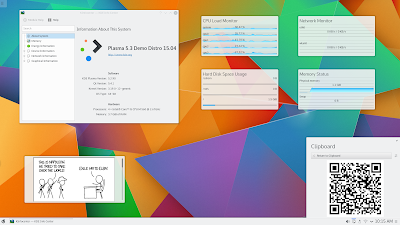
KDE Plasma (formerly K Desktop Environment and KDE Software Compilation and KDE Plasma Workspace and Applications) is an open source project comprised of numerous packages, libraries and applications designed to provide a modern graphical desktop environment for Linux and UNIX-like workstations.
What New in KDE Plasma 5.3.1:
A beautiful, modern and traditional desktop environment
It combines ease-of-use, superior graphical design and powerful functionality with the unique features and architecture of the Linux operating system. It’s comprised of the KDE Plasma Workspaces and KDE Applications components.
Additionally, it contains extra add-on for the panel and desktop, a download manager, an instant messenger, an addressbook, a document viewer, a multimedia layer called Phonon (similar to GStreamer on GNOME), and accessibility functionality, such as a powerful text-to-speech system.
to Install/Update KDE Plasma 5.3.1 on Fedora and other Fedora derivative systems, open a new Terminal window and bash (get it?) in the following commands:
to Install/Update KDE Plasma 5.3.1 on Arch Linux and other Arch Linux derivative systems, open a new Terminal window and bash (get it?) in the following commands:
Arch Linux: All the dependencies used for building frameworks can be installed by running:
Enjoy! I hope this article adding you more clarity.
Read more »

KDE Plasma (formerly K Desktop Environment and KDE Software Compilation and KDE Plasma Workspace and Applications) is an open source project comprised of numerous packages, libraries and applications designed to provide a modern graphical desktop environment for Linux and UNIX-like workstations.
What New in KDE Plasma 5.3.1:
- Bluedevil
- Fileitemactionplugin: Don't use blocking DBus calls. Commit. Fixes bug #347113
- Applet: Fix showing incorrect device name in connect failed notification. Commit.
- Update pin-code-database.xml. Commit.
- bluez-qt
- Don't ignore interface name in DBus properties changed signal. Commit.
- Breeze
- Cleanup tests in scrollarea event filter. Commit. Fixes bug #347971
- Default to Qt::AlignVCenter (instead of Qt::AlignTop) when vertical alignment flag is not set. Commit. See bug #346679
- Make sure iconSize is valid before rendering. Commit.
- Sanitize button positioning. Commit.
- Pass iconSize as button's parameter rather than trying to calculate it from geometry and offset. Commit.
- Implement SH_ItemView_ActivateItemOnSingleClick in kde4. Commit.
- Build on ARM. Commit.
- Plasma Addons
- DateTimeRunner: Fix off by 1 error. Commit. Fixes bug #346021
- Kimpanel: fix window position when coordinate is outside screen. Commit.
- KInfoCenter
- Extract messages from Modules/base into the catalog kcminfo. Commit. Code review #123864
- KIO Extras
- Don't mangle UDS_TARGET_URL to UDS_LOCAL_PATH in UDSEntries. Commit. Code review #123781
- KWin
- Fix presentwindows crash on disabling closebuttons. Commit. Code review #123865
- No VBO upload for zero vertex count. Commit. Fixes bug #347900. Code review #123865
- [effects] Fix loading of trackmouse effect textures. Commit. Code review #123862
- Show Desktop: activateNextClient prefers desktop. Commit. Code review #123783. See bug #346837. See bug #346933. See bug #347212
- Show Desktop: break state with activation (only). Commit. Code review #123783. See bug #346837. See bug #346933. See bug #347212
- Show Desktop: keep desktop group visible. Commit. Code review #123783. See bug #346837. See bug #346933. See bug #347212
- Showing Desktop: keep docks visible. Commit. Code review #123783. Fixes bug #346933. Fixes bug #347212. See bug #346837
- Fix CM reselection. Commit. Fixes bug #347813. Code review #123826
- Lazy setting of xbc properties on qApp. Commit. See bug #346748. Code review #123777
- Stall wobbling while screen is transformed. Commit. Code review #123733. Fixes bug #338972
- Ignore elevation list while screen is locked. Commit. Fixes bug #347466
- Prefer query Screens::refreshRate(). Commit. Fixes bug #347360. Code review #123693
- Add Screens::name(int screen); STUB but for XRandr. Commit.
- Add OutputInfo class to obtain output names. Commit.
- Add refreshRate to Screens. STUB but for XRandr!. Commit.
- Forward resource modes next to crtcs. Commit.
- Desk grid: do not recreate DesktopButtonsViews. Commit. Fixes bug #347339. Code review #123668
- Make switchWindow FROM stickies act on current VD. Commit. Fixes bug #331512. Code review #123640
- UpdateXTime before sending a takeFocus message. Commit. Fixes bug #347153. Code review #123639
- Window aperture always needs to cancel. Commit. Fixes bug #347174. Code review #123636
- Do not switch desktop on resizing windows. Commit. Code review #123599
- Break desktopshowing state from cover & flipswitch. Commit. Code review #123550. See bug #346837
- libkscreen
- Handle backend being deleted during GetConfigOperation. Commit. Fixes bug #347626. Code review #123860
- BackendLauncher: delete and unload backends before returning from main(). Commit.
- XRandR: use intermediate screen size when applying config. Commit.
- Fix crash introduced in previous commit. Commit.
- Fix potential crash when running ConfigOperation in exec() mode. Commit. Fixes bug #346575
- Muon
- Make sure the apt notifier gets initialized. Commit.
- --debug. Commit.
- Polish Discover menu configuration. Commit.
- Improve display of the update button. Commit. Fixes bug #343210
- Use proper icon to identify updates. Commit.
- Only emit about found updates when they change. Commit. See bug #346622
- Oxygen
- Default to Qt::AlignVCenter (instead of Qt::AlignTop) when vertical alignment flag is not set CCBUG: 346679. Commit.
- Fix popup menu items getting stray highlighted. Commit. Fixes bug #332377. Code review #123807
- Implement SH_ItemView_ActivateItemOnSingleClick. Commit.
- Plasma Desktop
- Require xorg-evdev >= 2.8.99.1. Commit.
- Fix translation of strings in kcm/touchpad.kcfg. Commit.
- Fix toolbox positioning. Commit. Fixes bug #347857
- Abort window highlight effect before launching present windows. Commit. Fixes bug #347395
- Remove redundant proxy. Commit.
- Fix force stripes on vertical. Commit.
- Add FindEvdev cmake module. Commit. Fixes bug #347749. Code review #123808
- KAStats: Properly resetting model when clear is called. Commit.
- Fix reverse scroll in Mouse KCM. Commit.
- Don't close when emptying Recent* categories. Commit.
- Adjust margins in vertical panels as horizontal. Commit.
- Don't add menu actions twice. Commit.
- Fix 'Add to Desktop' against the Folder containment being unreliable. Commit.
- SQLite supports offset only of limit is specified. Commit.
- Clean up some debug junk. Commit.
- Keeping ResultSet open as little as possible and fixing the count limit. Commit.
- Grab on the right item; fixes regression from 1c38100f while retaining the crash fix. Commit.
- Fix missing signal connect + some speed optimizations for KAMD submenu reveals. Commit.
- Fix race condition between PlacesModel and deriving URL from UI state. Commit.
- Use TextMetrics for lower bound. Commit.
- Ignore press events on scrollbars and make sure smooth scroll is disabled when not autoscrolling. Commit.
- Improve visibility of running widget checkmark. Commit. Code review #123539. Fixes bug #342112
- KActivitiesStats: Obey the item count limit for the ResultModel. Commit.
- Remove use of KCoreAddons.Format; KDirModel now returns preformatted data. Commit. Fixes bug #346567
- Plasma Media Center
- Use correct header for used class. Commit.
- Plasma Networkmanager (plasma-nm)
- Fix typo in END_TLS_AUTH_TAG. Commit. Fixes bug #347416
- Drop WiMAX support for NM 1.2.0+. Commit. Code review #123657
- Editor: request secrets when "secretkey-flags" is not present in setting. Commit.
- Add option to show/hide menu bar. Commit. Fixes bug #347141
- Plasma Workspace
- [libtaskmanager] Use windowClass from KWindowInfo instead fetching from X each time. Commit. See bug #340583
- Adjust the one pixel gap for right aligned panels. Commit. Fixes bug #347873
- Process updates scripts even after we load the default layout. Commit.
- Enable translations for devicenotifications dataengine. Commit. Code review #123846
- Add missing TRANSLATION_DOMAIN for dataengines keystate, network, rss, weather. Commit. Code review #123854
- Default to desktop sorting. Commit.
- ++paranoia;. Commit.
- [notifications] Make notifications work properly with --reverse. Commit. Code review #122648. Fixes bug #343251
- [notifications] Clip the NotificationItem to prevent painting outside of its rect. Commit. Fixes bug #346419
- [digital-clock] Add timezone filtering by region too. Commit. Code review #123740. Fixes bug #346681
- [klipper] Ensure global shortcut actions work. Commit. Fixes bug #345945. Code review #123727
- Guard access to kscreen configuration. Commit. Fixes bug #346590. Code review #123648CHANGELOGCHANGELOG:Fix crash on Plasma startup caused by a race condition
- [digital-clock] Use KCMShell.open for the formats KCM. Commit. Fixes bug #347032
- Make ConfigFile() reuse the Corona's KSharedConfigPtr when its config file is requested. Commit.
- Fix second arg not being used when parent is a ConfigGroup. Commit.
- [digital-clock] Fix missing function return. Commit.
- [digital-clock] Change the id of the root item. Commit. Fixes bug #346841
- When switching activities, use only the running ones. Commit. Fixes bug #347029. Code review #123597
- [notifications] Clear notification from show queue if it's closed before it's shown. Commit. Fixes bug #342605
- [notifications] Always check first if the dispatch timer isn't running already. Commit. See bug #342605
- Fix a crash in PowermanagementEngine::populateApplicationData when the given name is empty. Commit. Code review #123555
- Check for model existence. Commit. Fixes bug #346870
- Only restart Timer when the dialog is visible. Commit.
- Fix running applet calculation. Commit.
- Manually keep track of jobs sources. Commit. Code review #123502. Fixes bug #346673
- Match window switch dialog borders with addwidgets/switch activity. Commit. Fixes bug #345614. Code review #123506
- [notifications] Replace ' with ' as ' is not supported by StyledText. Commit. Fixes bug #346710
- Disable indeterminate animation for suspended jobs. Commit.
- Fix last commit. Commit.
- Fix logic in argument check in plasma-windowed. Commit. Fixes bug #346311
- Powerdevil
- Consider overall percentage when emitting battery warning on startup. Commit. Code review #123704. Fixes bug
A beautiful, modern and traditional desktop environment
It combines ease-of-use, superior graphical design and powerful functionality with the unique features and architecture of the Linux operating system. It’s comprised of the KDE Plasma Workspaces and KDE Applications components.
Additionally, it contains extra add-on for the panel and desktop, a download manager, an instant messenger, an addressbook, a document viewer, a multimedia layer called Phonon (similar to GStreamer on GNOME), and accessibility functionality, such as a powerful text-to-speech system.
How to Install/Update KDE Plasma 5.3.1 on Ubuntu, Debian, OpenSUSE, Fedora and Arch Linux :
to Install/Update KDE Plasma 5.3.1 on (K)Ubuntu and Debian and other Debian derivative systems, open a new Terminal window and bash (get it?) in the following commands:$ sudo apt-get build-dep qtbase5-dev
$ sudo apt-get install libbz2-dev libxslt-dev libxml2-dev shared-mime-info oxygen-icon-theme libgif-dev libvlc-dev libvlccore-dev doxygen gperf bzr libxapian-dev fontforge libgcrypt20-dev libattr1-dev network-manager-dev libgtk-3-dev xsltproc xserver-xorg-dev xserver-xorg-input-synaptics-dev libpwquality-dev modemmanager-dev libxcb-keysyms1-dev libepoxy-dev libpolkit-agent-1-dev libnm-util-dev libnm-glib-dev libegl-mesa-dev libxcb-xkb-dev libqt5x11extras5-dev libwww-perl libxml-parser-perl libjson-perl libboost1.55-dev libgstreamer-plugins-base1.0-dev libgstreamer1.0-devto Install/Update KDE Plasma 5.3.1 on OpenSUSE and other Debian derivative systems, open a new Terminal window and bash (get it?) in the following commands:
$ sudo zypper si -d libqt5-qtbase
$ sudo zypper in libbz2-devel libxslt-devel libxml2-devel shared-mime-info oxygen-icon-theme giflib-devel vlc-devel doxygen gstreamer-0_10-devel gstreamer-0_10-plugins-base-devel docbook-xml-slides docbook-xsl-stylesheets xcb-util-keysyms-devel perl-JSON boost-devel libxcb-devel libXrender-devel xcb-util-wm-devel xcb-util-devel xcb-util-image-devel gettext-tools
$ sudo zypper in gtk3-devel # for kde-gtk-config
$ sudo zypper in grantlee5 # for kdevplatform
$ sudo zypper in libkdcraw-devel liblcms2-devel # for gwenviewOptional for kdeplasma-addons: libibus >=1.4.2 (see http://software.opensuse.org/package/libibus-1_0-5)
to Install/Update KDE Plasma 5.3.1 on Fedora and other Fedora derivative systems, open a new Terminal window and bash (get it?) in the following commands:
$ sudo yum-builddep qt phonon-backend-vlc phonon-backend-gstreamer
$ sudo yum install gcc-c++ ruby doxygen git bzr flex bison gperf socat boost-devel bzip2-devel libxslt-devel libxml2-devel shared-mime-info oxygen-icon-theme giflib-devel xcb-util-keysyms-devel perl-JSON perl-Pod-Usage "*xcb*-devel" perl-XML-Parser NetworkManager-glib-devel xapian-core-devel libxkbcommon-devel libxkbcommon-x11-devel systemd-devel libwayland-cursor-devel libwayland-server-devel libepoxy-devel gtk3-devel sane-backends-devel libattr-devel libcanberra-devel libusb-devel libxkbfile-devel fontforge-devel libical-devel gpgme-devel cyrus-sasl-devel openldap-devel libpwquality-devel polkit-devel
to Install/Update KDE Plasma 5.3.1 on Arch Linux and other Arch Linux derivative systems, open a new Terminal window and bash (get it?) in the following commands:
Arch Linux: All the dependencies used for building frameworks can be installed by running:
$ sudo pacman -Sy phonon-qt5 qt5-webkit qt5-script qt5-svg qt5-tools qt5-x11extras enchant jasper openexr libutempter docbook-xsl shared-mime-info giflib libxss upower udisks2 bzr git doxygen perl-json perl-libwww
$ <your_AUR_helper> kf5-akonadi-git
Enjoy! I hope this article adding you more clarity.
MATE Desktop 1.10.0 Released, Install on ubuntu 14.10 Utopic Unicorn, Ubuntu 14.04 Trusty Tahr (LTS) and Linux Mint 17.1 Rebecca, Linux Mint 17 Qiana
Install MATE Desktop 1.10.0 on ubuntu 14.10 Utopic Unicorn, Ubuntu 14.04 Trusty Tahr (LTS) and Linux Mint 17.1 Rebecca, Linux Mint 17 Qiana

MATE is an open source desktop environment, a fork of the GNOME 2 window manager, specifically designed to be used by Linux OS developers who want to create lightweight, yet usable distributions that run on low-end computers.
Similar to GNOME Classic
Just like the GNOME desktop environment, MATE is comprised of several independent packages, which means that users can install the base and then add as many packages as they want.
Default applications
When taking a peek inside the desktop environment, we can immediately notice the Caja file manager forked from Nautilus, Pluma text editor forked from Gedit, Eye of MATE image viewer forked from Eye of GNOME, and Atril document viewer forked from Evince.
Additionally, the Engrampa compression utility is a fork of File Roller, the terminal emulator app is called MATE Terminal and it’s a fork of GNOME Terminal, and the Marco window manager has been forked from Metacity.
What's new in MATE 1.10.0:
- Turn MateRRScreen, GnomeRRConfig and GnomeOutputInfo into a GObject. Thanks to monsta for helping to test this.
- Add gobject introspection
- Many RANDR fixes
- interface: add automatic-mnemonics key for Gtk xsetting
- use GDK_WINDOW_XID for inter-GTK compatibility
- Updated mpaste for website change
- Added org.mate.debug GSettings schema
- Added MateColorButton class to have traditional color selection dialog with GTK3
- Removed desktop-docs
- Removed user guide
- Removed libunique optional dependency
- Added MateAboutDialog class to have traditional about dialog with GTK3 too
How to install Mate 1.10.0 on Ubuntu 14.10 systems:
Add the needed PPAs to your system and update the local repository index:
$ sudo apt-add-repository ppa:ubuntu-mate-dev/ppa
$ sudo apt-add-repository ppa:ubuntu-mate-dev/utopic-mate
$ sudo apt-get update
Install the minimal MATE desktop:
$ sudo apt-get install mate-desktop-environment-core
Install the complete MATE desktop:
$ sudo apt-get install mate-desktop-environment
Install the complete MATE desktop + some extras:
$ sudo apt-get install mate-desktop-environment-extras
How to install Mate 1.10.0 on Ubuntu 14.04 systems:
Add the needed PPAs to your system and update the local repository index:
$ sudo apt-add-repository ppa:ubuntu-mate-dev/ppa
$ sudo apt-add-repository ppa:ubuntu-mate-dev/trusty-mate
$ sudo apt-get update
Install the minimal MATE desktop:
$ sudo apt-get install mate-desktop-environment-core
Install the complete MATE desktop:
$ sudo apt-get install mate-desktop-environment
Install the complete MATE desktop + some extras:
$ sudo apt-get install mate-desktop-environment-extras
How to install Mate 1.10.0 on Linux Mint 17.1 and Linux Mint 17 systems:
Add the needed PPAs to your system and update the local repository index:
$ sudo apt-add-repository ppa:ubuntu-mate-dev/ppa
$ sudo apt-add-repository ppa:ubuntu-mate-dev/trusty-mate
$ sudo apt-get update
Install the complete MATE desktop for Linux Mint:
$ apt-get install mint-meta-mate
Enjoy! I hope this article adding you more clarity.
KDE Plasma 5.3 is out and How to Compile it !

KDE Plasma (formerly K Desktop Environment and KDE Software Compilation and KDE Plasma Workspace and Applications) is an open source project comprised of numerous packages, libraries and applications designed to provide a modern graphical desktop environment for Linux and UNIX-like workstations.
A beautiful, modern and traditional desktop environment
It combines ease-of-use, superior graphical design and powerful functionality with the unique features and architecture of the Linux operating system. It’s comprised of the KDE Plasma Workspaces and KDE Applications components.
Additionally, it contains extra add-on for the panel and desktop, a download manager, an instant messenger, an addressbook, a document viewer, a multimedia layer called Phonon (similar to GStreamer on GNOME), and accessibility functionality, such as a powerful text-to-speech system.
Read Latest Ubuntu PPA
Highlights KDE Plasma 5.3 :
Enhanced Power Management
- Power management settings can be configured differently for certain activities
- Laptop will not suspend when closing the lid while an external monitor is connected ('cinema mode', by default, can be turned off)
- Power management inhibitions block lock screen too
- Screen brightness changes are now animated on most hardware
- No longer suspends when closing the lid while shutting down
- Support for keyboard button brightness controls on lock screen
- KInfoCenter provides statistics about energy consumption
- Battery monitor now shows which applications are currently holding a power management inhibition for example ('Chrome is currently suppressing PM: Playing video')
Better Bluetooth Capabilities
- New Bluetooth applet
- Bluedevil was ported to a new library from KDE, BluezQt
- Added support for blocking and unblocking Bluetooth
- Connected devices with Browse Files (ObexFTP) support are now displayed in the file dialog's Places panel
Improved Plasma Widgets
- Clipboard applet gains support for showing barcodes The Desktop and Folder View containment codebases were unified, and have seen performance improvements
- The Recent Documents and Recent Applications sections in Application Menu (Kicker) are now powered by KDE activities
- Comics widget returns
- System monitor plasmoids return, such as CPU Load Monitor and Hard Disk usage
Plasma Media Center
- Plasma Media Center is added as a tech preview in this release. It is fully stable but misses a few features compared to version 1. You can log directly into a Plasma Media Center session if you want to use it on a media device such as a television or projector or you can run it from Plasma Desktop. It will scan for videos, music and pictures on your computer to let you browse and play them.
To Compile KDE Plasma 5.3 you can follow this page.
How to Install KDE Plasma 5.3 on (K)Ubuntu 15.04 Vivid Vervet
How to Install KDE Plasma 5.3 on (K)Ubuntu 15.04 Vivid Vervet via PPA

KDE Plasma (formerly K Desktop Environment and KDE Software Compilation and KDE Plasma Workspace and Applications) is an open source project comprised of numerous packages, libraries and applications designed to provide a modern graphical desktop environment for Linux and UNIX-like workstations.
A beautiful, modern and traditional desktop environment
It combines ease-of-use, superior graphical design and powerful functionality with the unique features and architecture of the Linux operating system. It’s comprised of the KDE Plasma Workspaces and KDE Applications components.
Additionally, it contains extra add-on for the panel and desktop, a download manager, an instant messenger, an addressbook, a document viewer, a multimedia layer called Phonon (similar to GStreamer on GNOME), and accessibility functionality, such as a powerful text-to-speech system.
What's new in KDE Plasma 5.3:
To add the Kubuntu Backports PPA repository, open the Unity Dash and search for Terminal. Open the Terminal app, and then copy and paste the following command in the console window:
Uninstalling KDE Plasma 5.3 from (K)Ubuntu 15.04 Vivid Vervet
If for some reason you don't want to have the KDE Plasma 5.3 desktop environment installed on your Ubuntu 15.04 machine, you can uninstall it by running the following commands in a Terminal window, one by one, hitting Enter after each one.
KDE Plasma (formerly K Desktop Environment and KDE Software Compilation and KDE Plasma Workspace and Applications) is an open source project comprised of numerous packages, libraries and applications designed to provide a modern graphical desktop environment for Linux and UNIX-like workstations.
A beautiful, modern and traditional desktop environment
It combines ease-of-use, superior graphical design and powerful functionality with the unique features and architecture of the Linux operating system. It’s comprised of the KDE Plasma Workspaces and KDE Applications components.
Additionally, it contains extra add-on for the panel and desktop, a download manager, an instant messenger, an addressbook, a document viewer, a multimedia layer called Phonon (similar to GStreamer on GNOME), and accessibility functionality, such as a powerful text-to-speech system.
What's new in KDE Plasma 5.3:
- Battery applet now informs what is blocking power saving
- Energy Usage monitor
- New energy usage monitor
- Enhanced Power Management
- Power management settings can be configured
- differently for certain activities
- Laptop will not suspend when closing the lid while an external monitor is
- connected ('cinema mode', by default, can be turned off)
- Power management inhibitions block lock screen too
- Screen brightness changes are now animated on most hardware
- No longer suspends when closing the lid while shutting down
- Support for keyboard button brightness controls on lock screen
- KInfoCenter provides statistics about energy consumption
- Battery monitor now shows which applications are currently holding a power management
- inhibition for example ('Chrome is currently suppressing PM: Playing video')
- The new Bluedevil Applet
- Better Bluetooth Capabilities
- New Bluetooth applet
- Bluedevil was ported to a new library from KDE, BluezQt
- Added support for blocking and unblocking Bluetooth
- Connected devices with Browse Files (ObexFTP) support are now displayed in the file dialog's Places panel
- A touchpad configuration module has been added
- Application Menu can access contacts
- Application Menu can show recent documents
- Improved Plasma Widgets
- Clipboard applet gains support for showing barcodes
- The Desktop and Folder View containment codebases were
- unified, and have seen performance improvements
- The Recent Documents and Recent Applications sections in
- Application Menu (Kicker) are now powered by KDE activities
- Comics widget returns
- System monitor plasmoids return, such as CPU Load Monitor and Hard Disk usage
- Plasma Media Center is added as a tech preview in this release. It is fully stable but misses a few features compared to version 1. You can log directly into a Plasma Media Center session if you want to use it on a media device such as a television or projector or you can run it from Plasma Desktop. It will scan for videos, music and pictures on your computer to let you browse and play them.
- Plasma is now able to start a nested XWayland server
How to Install KDE Plasma 5.3 on (K)Ubuntu 15.04 Vivid Vervet
Adding the Kubuntu Backports PPA repository and Install KDE Plasma 5.3To add the Kubuntu Backports PPA repository, open the Unity Dash and search for Terminal. Open the Terminal app, and then copy and paste the following command in the console window:
sudo add-apt-repository ppa:kubuntu-ppa/backports
sudo apt-get update && sudo apt-get dist-upgrade
sudo apt-get install kubuntu-desktop
Uninstalling KDE Plasma 5.3 from (K)Ubuntu 15.04 Vivid Vervet
If for some reason you don't want to have the KDE Plasma 5.3 desktop environment installed on your Ubuntu 15.04 machine, you can uninstall it by running the following commands in a Terminal window, one by one, hitting Enter after each one.
sudo apt-get install ppa-purgeEnjoy! I hope this article adding you more clarity.
sudo ppa-purge ppa:kubuntu-ppa/backports
sudo apt-get purge kubuntu-desktop sddm
sudo apt-get autoremove
LightDM 1.12.2 released, available for Arch, Debian, Elementary OS, Fedora, Gentoo, Mageia, OpenSUSE, Ubuntu

The Light Display Manager (LightDM) 1.12.2 released, available for Arch, Debian, Elementary OS, Fedora, Gentoo, Mageia, OpenSUSE, Ubuntu
LightDM is an open source graphical software that can be used as a greeter/login manage or display manager on any Linux-based operating system that uses the X Window System. LightDM is also known as The Light Display Manager, and it is appreciated by Linux distribution developers, package developers, and system implementors for its well-defined greeter API, which supports multiple graphical user interfaces.
What's new in LightDM 1.12.1:
- Fix crash when having configuration keys defined in multiple places
- Allow user switching in multi-seat until bug stopping greeter showing on logout is fixed
- Disable log message when AccountsService users change
Supports a wide range of desktop environments
Supporting the GNOME, KDE, Razor-Qt, Unity and Elementary desktop environments, the LightDM software integrates well with each of the aforementioned environments via separate installable packages. In addition, all display manager use cases are well supported, backed by plugins where needed. Not to mention that the application provides users with low code complexity and fast performance on all Linux operating systems.
Default in Ubuntu, available on dozens of distros
Canonical selected LightDM as the default login manager for its Ubuntu Linux operating system. It is also used in the Xubuntu, Kubuntu, Edubuntu and Mythbuntu distributions. We recommend LightDM for all Linux users who want a modern, eye-candy and reliable display manager for their Linux distribution. It can easily replace GDM, XDM, KDM, and other similar login managers.
Install The Light Display Manager (LightDM) 1.12.2 on Arch, Debian, Elementary OS, Fedora, Gentoo, Mageia, OpenSUSE, Ubuntu :
LightDM is available in the following distributions:Development is hosted on Launchpad. Tarball releases are available.
GNOME 3.15.4 release, developers preview version
 |
| GNOME 3.15.4 |
GNOME 3.15.4 release, developers preview version
GNOME 3 is an easy and elegant way to use your computer. It is designed to put you in control and bring freedom to everybody. GNOME 3 is developed by the GNOME community, a diverse, international group of contributors that is supported by an independent, non-profit foundation.
The GNOME development platform is also an important part of the GNOME desktop environment, providing an extensive, developer-friendly framework for building applications that integrate into the rest of the desktop. With GNOME, the user is in control of everything, as the desktop is simple and easy to use, helping you get things done quickly. It is finely crafted and gives you easy access to all of your data.
What's new in GNOME 3.15.4:
Among the new things in this snapshot, you can find clutter using the GDK backend, libinput used in multiple modules (we require libinput 0.8), gnome-shell using vp9 for screencasts, mutter using GTK+ themes, input configuration under Wayland, scrolling changes in GTK+, improved search in gnome-software, a new game (gnome-taquin), and many more.
Default applications
Default applications include the Baobab disk usage analyzer, Brasero CD/DVD burning software, Cheese webcam utility, Empathy instant messenger, Devhelp documentation browser, Anjuta IDE, Evince document viewer, Eye of GNOME image viewer, File Roller archive manager, Evolution mail, contacts, and calendar suite, Totem media player, Seahorse PGP and SSH key-manager, Orca screen-reader, Vinagre VNC client, Gedit text editor, and Nautilus file manager.
In addition, the following GNOME apps are available: Gcalctool, Glade, Boxes, Color Manager, Contacts, Control Center, Dictionary Dictionary, Disks, Documents, Font Viewer, Keyring Manager, Screenshot, Sound Recorder, Logs, System Monitor, Terminal, Gucharmap, and an impressive collection of games.
In addition, the following GNOME apps are available: Gcalctool, Glade, Boxes, Color Manager, Contacts, Control Center, Dictionary Dictionary, Disks, Documents, Font Viewer, Keyring Manager, Screenshot, Sound Recorder, Logs, System Monitor, Terminal, Gucharmap, and an impressive collection of games.
GNOME 3.15.4 release, developers preview version
Related Links :
[1] http://library.gnome.org/devel/jhbuild/
[2] http://download.gnome.org/teams/releng/3.15.4/
[3] https://wiki.gnome.org/Projects/GnomeContinuous#Installation
[2] http://download.gnome.org/teams/releng/3.15.4/
[3] https://wiki.gnome.org/Projects/GnomeContinuous#Installation
New features:
core - http://download.gnome.org/core/3.15/3.15.4/NEWS
apps - http://download.gnome.org/apps/3.15/3.15.4/NEWS
apps - http://download.gnome.org/apps/3.15/3.15.4/NEWS
GNOME 3.15.4 is now available at:
core sources - http://download.gnome.org/core/3.15/3.15.4
apps sources - http://download.gnome.org/apps/3.15/3.15.4
apps sources - http://download.gnome.org/apps/3.15/3.15.4
More details see the release notes.
GNOME is a support multiple platform development & desktop environment that can run on, including GNU / Linux (commonly called Linux), Solaris, HP-UX, BSD and Apple's Darwin system GNOME has many powerful features, such as: High smooth text rendering quality, and availability of the first international support, and includes support for the reverse text (Note: in some countries, the text is right-to-left layout).
Cinnamon 2.4.5 released, install in in Linux Mint 17, Ubuntu 14.10 and Ubuntu 14.04 based distro

Cinnamon 2.4.5 released, install in in Linux Mint 17, Ubuntu 14.10 and Ubuntu 14.04 based distro
Cinnamon is an open source project that provides users with a full featured desktop environment for GNU/Linux operating systems. It is a fork of the GNOME Shell user interface distributed with the GNOME project. It has been designed from the ground up to provide users with a traditional, yet advanced and modern graphical session for their Linux-based operating systems. It's usually deployed on the Linux Mint distribution.Designed for Linux Mint
Actually, the Cinnamon project has been developed by the same team of hard working people behind the Linux Mint project, out of frustration with the GNOME desktop environment. However, the desktop environment is not attached to the Linux Mint distribution, as it can be easily installed on other open source GNU/Linux operating system, straight from their default software repositories or using third-party ones provided by the community.
What's New in This Release:
- Fixed startup animation
To Install Cinnamon 2.4.5 in Linux Ubuntu (Ubuntu 14.10 Utopic Unicorn, Ubuntu 14.04 Trusty Tahr) derivative system using PPA's, open a new Terminal window and bash (get it?) in the following commands :
sudo add-apt-repository ppa:gwendal-lebihan-dev/cinnamon-nightly
sudo apt-get update
sudo apt-get install cinnamon
To revert the changes, open a new Terminal window and bash (get it?) in the following commands:
sudo apt-get remove cinnamon
sudo apt-get autoremove
sudo add-apt-repository -r ppa:gwendal-lebihan-dev/cinnamon-nightly
sudo apt-get update
To install or update Cinnamon 2.4.5 on Linux Mint 17, we have to add the Romeo (Backports) repository, update the local repository index and install the cinnamon package. open a new Terminal window and bash (get it?) in the following commands:
sudo add-apt-repository "deb http://packages.linuxmint.com qiana romeo"
sudo apt-get update
sudo apt-get install cinnamon
To revert the changes, open a new Terminal window and bash (get it?) in the following commands:
sudo apt-get remove cinnamonOur hope tutorial entitled "Cinnamon 2.4.5 released, install in in Linux Mint 17, Ubuntu 14.10 and Ubuntu 14.04 based distro" can be useful for visitors.
sudo apt-get autoremove
sudo add-apt-repository -r "deb http://packages.linuxmint.com qiana romeo"
sudo apt-get update
KDE Plasma 5.2.2 is released, Install on Arch Linux, Exherbo Linux, Fedora, Gentoo Linux, Kubuntu, openSUSE, Slackware and ROSA

KDE Plasma 5.2.2 is released, How to Install, update or Upgrade on Arch Linux, Exherbo Linux, Fedora, Gentoo Linux, Kubuntu, openSUSE, Slackware and ROSA
KDE Plasma (formerly K Desktop Environment and KDE Software Compilation and KDE Plasma Workspace and Applications) is an open source project comprised of numerous packages, libraries and applications designed to provide a modern graphical desktop environment for Linux and UNIX-like workstations.
KDE releases a bugfix update to Plasma 5, versioned 5.2.2. Plasma 5.2was released in January with many feature refinements and new modules to complete the desktop experience.
This release adds a month's worth of new translations and fixes from KDE's contributors. The bugfixes are typically small but important and include :
What's new in KDE Plasma 5.2.2:
- Breeze:
- Pass both caption rect and alignment as output from ::captionRect. Commit. See bug #344552
- Find KF5GuiAddons and KF5I18n. Commit.
- Fixed background color behind scrollbars in dolphin's side panels. Commit.
- Removed ellision flag from captionRect (broken anyway). Commit. See bug #344552
- On testing again breeze icons do work in gtk. Commit.
- Create gtk-3.0 directory before putting the settings file into it. Commit.
- Check widget validity before calling deleteLater. Commit. Fixes bug #344980
- Return parent style method when option passed to tabBar rect is invalid, instead of full option rect. Commit. Fixes bug #344779
- Check scrollbar policy before forwarding events. Commit. Fixes bug #343659
- Added an explicit flag as output from captionRect to tell whether caption must be ellided
- KDE GTK Config:
- Use the correct version of desktop_to_json. Commit.
- Fix ecm_install_icons warning. Commit.
- Configsavetest: Use QTEST_GUILESS_MAIN. Commit. Code review #123045
- This targets are used in project; find them. Commit.
- Simplify regular expression that matches fonts. Commit.
- Disable test for now. Commit.
- Fix issue in font parser. Commit.
A beautiful, modern and traditional desktop environment
It combines ease-of-use, superior graphical design and powerful functionality with the unique features and architecture of the Linux operating system. It’s comprised of the KDE Plasma Workspaces and KDE Applications components.
Additionally, it contains extra add-on for the panel and desktop, a download manager, an instant messenger, an addressbook, a document viewer, a multimedia layer called Phonon (similar to GStreamer on GNOME), and accessibility functionality, such as a powerful text-to-speech system.
How to Install, update or Upgrade KDE Plasma 5.2.2 on Arch Linux, Exherbo Linux, Fedora 20, 21, 22, Gentoo Linux, Kubuntu 14.04, 14.10, 15.05, openSUSE 13.1, 13.2, Slackware and ROSA :
Arch Linux
Plasma Next packages are available in the [extra] repository. To install it run:a
# pacman -Syuor
# pacman -S plasma-meta
# pacman -Syu
# pacman -S plasma
Exherbo Linux
We currently provide Plasma 5 packages in the kde repository. They can easily be installed with the help of the plasma set:
# cave resolve plasma*
Fedora
We provide Plasma 5 packages for Fedora 20 and 21 in the dvratil/plasma-5 Copr repository. (Please note that these packages replace Plasma 4. The Plasma 4 and Plasma 5 workspaces cannot be installed in parallel from our RPMs.) The required KDE Frameworks 5 packages are available in the official Fedora repositories for Fedora 20 (in updates) and 21, and will be automatically installed as dependencies of the Plasma 5 packages. (Unlike the Plasma workspaces, the libraries, i.e. KDE Frameworks 5, kdelibs 4 and kdelibs 3, can be installed in parallel.)
Add the Plasma 5 Copr to Yum and install the plasma-5 meta-package, which will install all needed packages.
# wget http://copr.fedoraproject.org/coprs/dvratil/plasma-5/repo/fedora-20/dvratil-plasma-5-fedora-20.repoOn Fedora 21, replace fedora-20 with fedora-21.
# yum install plasma5
If you use DNF, simply install dnf-plugins-core and run
dnf copr enable dvratil/plasma-5Plasma 5 will replace Plasma 4 as the system version of Plasma in Fedora 22. Until that happens, packages for Rawhide (i.e. what will become Fedora 22 and newer) are also available from the dvratil/plasma-5 Copr repository.
dnf install plasma5
For all those who want to try out Plasma 5 without affecting their existing Plasma 4 installation, we also provide an x86_64 live image with Plasma 5 based on Fedora 20: http://pub.dvratil.cz/plasma/iso/5.1/.
Gentoo Linux
Plasma 5 packages are currently in the KDE overlay. For more information please visit the Gentoo wiki Kubuntu
Packages for Kubuntu Utopic Next and Next backports PPAs for Utopic (14.10) are now deprecated. To test upgrade to Vivid, please use the PPA-purge package to remove those PPAs and packages, and then install `kubuntu-desktop` meta-package, and finally:
sudo apt update && sudo apt full-upgradebefore initiating:
sudo kubuntu-devel-release-upgradeto move to Vivid beta. Full instructions to upgrade from 14.10.
Live Image of Kubuntu Vivid with Packages from Git The Weekly Live Image, updated every Friday with latest source from Git to run a full system from a USB disk. Based on Kubuntu 15.04, Vivid.
KDE Frameworks 5 and Plasma 5 is available in the Vivid development version of Kubuntu, now in beta.
openSUSE
Packages are provided in KDE:Frameworks5 and KDE:Qt5 repositories, for openSUSE 13.1:
zypper ar -f http://download.opensuse.org/repositories/KDE:/Qt5/openSUSE_13.1/ Qt5openSUSE Factory:
zypper ar -f http://download.opensuse.org/repositories/KDE:/Frameworks5/openSUSE_13.1/ KF5
zypper ar -f http://download.opensuse.org/repositories/KDE:/Frameworks5/openSUSE_Factory/ KF5For openSUSE 13.2:
zypper ar -f http://download.opensuse.org/repositories/KDE:/Qt5/openSUSE_13.2/For more details see this page.
zypper ar -f http://download.opensuse.org/repositories/KDE:/Frameworks5/openSUSE_13.2/
Slackware
You can get Plasma 5 packages for Slackware-current from Alien BOB's repository. They should be installed on top of the latest KDE 4 package set from that same repository. Read more background on Eric's blog ROSA
We provide Plasma 5 packages for ROSA Desktop Fresh in the unofficial KDE Backports repository. They can easily be installed with a single command: # urpmi task-plasma5
Link PPA Ubuntu Archive : http://media-opensource.blogspot.com/p/ppa-ubuntu.html
KDE Plasma 5.2.1 released, Available on (K)ubuntu, Debian, Linux Mint, Fedora, OpenSUSE and Arch Linux

KDE Plasma 5.2.1 released, Available on (K)ubuntu 15.04 vivid Vervet, ubuntu 14.10 Utopic Unicorn, Ubuntu 14.04 Trusty Tahr (LTS), Debian 8 "jessie", Debian 7 "wheezy", Linux Mint 17.1 Rebecca, Linux Mint 17 Qiana, Fedora 21, Fedora 20, OpenSUSE 13.2, OpenSUSE 13.1 and Arch Linux
KDE Plasma (formerly K Desktop Environment and KDE Software Compilation and KDE Plasma Workspace and Applications) is an open source project comprised of numerous packages, libraries and applications designed to provide a modern graphical desktop environment for Linux and UNIX-like workstations.
What's new in KDE Plasma 5.2.1:
- Don't turn off the screen or suspend the computer when watching videos in a web browser
- Fix Powerdevil from using full CPU
- Show the correct prompt for a fingerprint reader swipe
- Show correct connection name in Plasma Network Manager
- Remove kdelibs4support code in many modules
- Fix crash when switching to/from Breeze widget style
- In KScreen fix crash when multiple EDID requests for the same output are enqueued
- In KScreen fix visual representation of output rotation
- In Oxygen style improved rendering of checkbox menu item's contrast pixel, especially when selected using Strong highlight.
- In Plasma Desktop improve rubber band feel and consistency with Dolphin.
- In Plasma Desktop use smooth transformation for scaling down the user picture
- When setting color scheme information for KDElibs 4, don't read from KF5 kdeglobals
- Baloo KCM: Show proper icons (porting bug)
- Full 5.2.1 changelog
Additionally, it contains extra add-on for the panel and desktop, a download manager, an instant messenger, an addressbook, a document viewer, a multimedia layer called Phonon (similar to GStreamer on GNOME), and accessibility functionality, such as a powerful text-to-speech system.
Comes pre-loaded with apps for daily tasks
Users will find at least one application for each common task, including emailing, web browsing, news reading, painting, image viewing, video and music playback, and many more.
It also includes a collection of basic utilities, such as a calculator or archive manager, various scientific and educational applications, packages that contain extra themes, icons, wallpapers, window decorations and screensavers, some system administration tools, bindings for well known programming languages, and many games.
Install/Update and Upgrade KDE Plasma 5.2.1 on (K)ubuntu 15.04 vivid Vervet, ubuntu 14.10 Utopic Unicorn, Ubuntu 14.04 Trusty Tahr (LTS), Debian 8 "jessie", Debian 7 "wheezy", Linux Mint 17.1 Rebecca, Linux Mint 17 Qiana, Fedora 21, Fedora 20, OpenSUSE 13.2, OpenSUSE 13.1 and Arch Linux :
to install KDE Plasma 5.2.1 on Ubuntu 15.04 vivid Vervet, ubuntu 14.10 Utopic Unicorn, Ubuntu 14.04 Trusty Tahr (LTS), Linux Mint 17.1 Rebecca, Linux Mint 17 Qiana, Linux Mint 13 Maya, Pinguy OS 14.04, Elementary OS 0.3 Freya, Elementary OS 0.2 Luna, Peppermint Five, Deepin 2014, LXLE 14.04, Linux Lite 2.0, Linux Lite 2.2, Debian 8 "jessie", Debian 7 "wheezy", Debian 6 "squeeze", Kali linux 1.0.9, Kali Linux 1.0.8 (and old version 1.0.7, 1.0.6, 1.0.5), KNOPPIX, Kanotix, Astra Linux, Blankon Linux 9.0 suroboyo, Blankon Linux 8.0 rote , Blankon Linux 10.0 tambora (upcoming) and old version 7.0, Univention Corporate Server and other debian derivative systems, open a new Terminal window and bash (get it?) in the following commands:
$ sudo apt-get build-dep qtbase5-dev
$ sudo apt-get install libbz2-dev libxslt-dev libxml2-dev shared-mime-info oxygen-icon-theme libgif-dev libvlc-dev libvlccore-dev doxygen gperf bzr libxapian-dev fontforge libgcrypt20-dev libattr1-dev network-manager-dev libgtk-3-dev xsltproc xserver-xorg-dev xserver-xorg-input-synaptics-dev libpwquality-dev modemmanager-dev libxcb-keysyms1-dev libepoxy-dev libpolkit-agent-1-dev libnm-util-dev libnm-glib-dev libegl-mesa-dev libxcb-xkb-dev
Install on OpenSUSE 13.2, OpenSUSE 13.1 :
All the necessary dependencies:
$ sudo zypper si -d libqt5-qtbase
$ sudo zypper in libbz2-devel libxslt-devel libxml2-devel shared-mime-info oxygen-icon-theme giflib-devel vlc-devel doxygen gstreamer-0_10-devel gstreamer-0_10-plugins-base-devel docbook-xml-slides docbook-xsl-stylesheets xcb-util-keysyms-devel perl-JSON boost-devel libxcb-devel libXrender-devel xcb-util-wm-devel xcb-util-devel xcb-util-image-devel gettext-tools
$ sudo zypper in gtk3-devel # for kde-gtk-config
$ sudo zypper in grantlee5 # for kdevplatform
$ sudo zypper in libkdcraw-devel liblcms2-devel # for gwenview
# optional for kdeplasma-addons: libibus >=1.4.2 (see http://software.opensuse.org/package/libibus-1_0-5)
Install on Fedora 21 and Fedora 20 :
All the dependencies used for building frameworks can be installed by running:
$ sudo yum-builddep qt phonon-backend-vlc phonon-backend-gstreamer
$ sudo yum install gcc-c++ ruby doxygen git bzr flex bison gperf socat boost-devel bzip2-devel libxslt-devel libxml2-devel shared-mime-info oxygen-icon-theme giflib-devel xcb-util-keysyms-devel perl-JSON perl-Pod-Usage "*xcb*-devel" perl-XML-Parser NetworkManager-glib-devel xapian-core-devel libxkbcommon-devel libxkbcommon-x11-devel systemd-devel libwayland-cursor-devel libwayland-server-devel libepoxy-devel gtk3-devel sane-backends-devel libcanberra-devel libusb-devel libxkbfile-devel fontforge-devel libical-devel gpgme-devel cyrus-sasl-devel openldap-devel
Install on Arch Linux:
All the dependencies used for building frameworks can be installed by running:
$ sudo pacman -Sy phonon-qt5 qt5-webkit qt5-script qt5-svg qt5-tools qt5-x11extras enchant jasper openexr libutempter docbook-xsl shared-mime-info giflib libxss upower udisks2 bzr git doxygen perl-json perl-libwwwReleased Announc | Home KDE
$ <your_AUR_helper> kf5-akonadi-git
KDE Plasma 5.2 Beta released, Avilable for Kubuntu 14.10, Fedora, Gentoo, OpenSUSE and Slackware

Today KDE releases a beta for Plasma 5.2. This release adds a number of new components and improves the existing desktop. We welcome all testers to find and help fix the bugs before our stable release in two weeks' time.
KDE Plasma (formerly K Desktop Environment and KDE Software Compilation and KDE Plasma Workspace and Applications) is an open source project comprised of numerous packages, libraries and applications designed to provide a modern graphical desktop environment for Linux and UNIX-like workstations.
What's New in version 5.2 Beta :
- BlueDevil: a range of desktop components to manage Bluetooth devices. It'll set up your mouse, keyboard, send & receive files and you can browse for devices.
- KSSHAskPass: if you access computers with ssh keys but those keys have passwords this module will give you a graphical UI to enter those passwords.
- Muon: install and manage software and other addons for your computer.
- Login theme configuration (SDDM): SDDM is now the login manager of choice for Plasma and this new System Settings module allows you to configure the theme.
- KScreen: getting its first release for Plasma 5 is the System Settings module to set up multiple monitor support.
- GTK Application Style: this new module lets you configure themeing of applications from Gnome.
- KDecoration: this new library makes it easier and more reliable to make themes for KWin, Plasma's window manager.

It combines ease-of-use, superior graphical design and powerful functionality with the unique features and architecture of the Linux operating system. It’s comprised of the KDE Plasma Workspaces and KDE Applications components.
Additionally, it contains extra add-on for the panel and desktop, a download manager, an instant messenger, an addressbook, a document viewer, a multimedia layer called Phonon (similar to GStreamer on GNOME), and accessibility functionality, such as a powerful text-to-speech system.
It is one of the first and best desktop environments for Linux distributions. During the last couple of years, KDE proved to be a very mature, reliable and stable project, backed by a talented community.
You can install Plasma 5 directly from source. KDE's community wiki has instructions to compile it.
Note that Plasma 5 does not co-install with Plasma 4, you will need to uninstall older versions or install into a separate prefix.
Install / Update KDE Plasma 5.2 Beta on Linux Kubuntu 14.10 :
KDE Plasma 5.2 Beta avaiable on PPA, open a new Terminal window and bash (get it?) in the following commands:sudo apt-add-repository ppa:kubuntu-ppa/nextFor daily builds, install ppa:kubuntu-ci/unstable as above.
sudo apt update
sudo apt install kubuntu-plasma5-desktop
sudo apt full-upgrade
sudo reboot
Live Images of Utopic Kubuntu Plasma 5 images are a development build of what will become the default desktop for Kubuntu next year.
Live Image of Kubuntu Utopic with Packages from Git The Weekly Live Image, updated every Friday with latest source from Git to run a full system from a USB disk. Based on Kubuntu 14.10.
KDE Plasma 5.2 Beta on OpenSUSE :
Packages are provided in KDE:Frameworks5 and KDE:Qt5 repositories, for openSUSE 13.1:zypper ar -f http://download.opensuse.org/repositories/KDE:/Qt5/openSUSE_13.1/ Qt5openSUSE Factory:
zypper ar -f http://download.opensuse.org/repositories/KDE:/Frameworks5/openSUSE_13.1/ KF5
zypper ar -f http://download.opensuse.org/repositories/KDE:/Frameworks5/openSUSE_Factory/ KF5For openSUSE 13.2 :
zypper ar -f http://download.opensuse.org/repositories/KDE:/Qt5/openSUSE_13.2/For more details see this page.
zypper ar -f http://download.opensuse.org/repositories/KDE:/Frameworks5/openSUSE_13.2/
KDE Plasma 5.2 Beta ON slackware :
You can get Plasma 5 packages for Slackware-current from Alien BOB's repository. They should be installed on top of the latest KDE 4 package set from that same repository. Read more background on Eric's blogKDE Plasma 5.2 Beta on Arch Linux :
Plasma Next packages are available in the [extra] repository. To install it run:# pacman -Syu
# pacman -S plasma-next
KDE Plasma 5.2 Beta on Fedora 20, Fedora 21 and Fedora 22
We provide Plasma 5 packages for Fedora 20 and 21 in the dvratil/plasma-5 Copr repository. (Please note that these packages replace Plasma 4. The Plasma 4 and Plasma 5 workspaces cannot be installed in parallel from our RPMs.) The required KDE Frameworks 5 packages are available in the official Fedora repositories for Fedora 20 (in updates) and 21, and will be automatically installed as dependencies of the Plasma 5 packages. (Unlike the Plasma workspaces, the libraries, i.e. KDE Frameworks 5, kdelibs 4 and kdelibs 3, can be installed in parallel.)Add the Plasma 5 Copr to Yum and install the plasma-5 meta-package, which will install all needed packages.
wget http://copr.fedoraproject.org/coprs/dvratil/plasma-5/repo/fedora-20/dvratil-plasma-5-fedora-20.repo
yum install plasma5
On Fedora 21, replace fedora-20 with fedora-21.
If you use DNF, simply install dnf-plugins-core and run
dnf copr enable dvratil/plasma-5
dnf install plasma5
Plasma 5 will replace Plasma 4 as the system version of Plasma in Fedora 22. Until that happens, packages for Rawhide (i.e. what will become Fedora 22 and newer) are also available from the dvratil/plasma-5 Copr repository.
For all those who want to try out Plasma 5 without affecting their existing Plasma 4 installation, we also provide an x86_64 live image with Plasma 5 based on Fedora 20: http://pub.dvratil.cz/plasma/iso/5.1/.
Install Cinnamon 2.4 in Linux Mint 17 and Ubuntu 14.04, 14.10 based distro [PPA]

Install Cinnamon 2.4 in Linux Mint 17 and Ubuntu 14.04, 14.10 based distro [PPA]
Cinnamon is an open source project that provides users with a full featured desktop environment for GNU/Linux operating systems. It is a fork of the GNOME Shell user interface distributed with the GNOME project. It has been designed from the ground up to provide users with a traditional, yet advanced and modern graphical session for their Linux-based operating systems. It's usually deployed on the Linux Mint distribution. and Cinnamon 2.4 Will Include on Linux Mint 17.1 “Rebecca”
Chamgelog Cinnamon 2.4.1
Responsiveness and memory usage:- CJS was rebased on a newer version of GJS in an effort to reduce memory usage and provide faster execution times.
- All Cinnamon components were reviewed and their source code was checked with static analysis tools. Although most of them were small, about 30 memory leaks were fixed.
- Icons used in Cinnamon Settings were added to the Mint-X icon theme. This increased responsiveness (This is specific to Linux Mint so we encourage all artists and distributions to do the same).
- Credit to and similar to GNOME Shell, the Cinnamon desktop now starts with a zoom animation.
- The login sound is now handled directly by Cinnamon (as opposed to cinnamon-settings-daemon) and plays in sync with the login sequence.
- Modules in Cinnamon Settings and categories in the application menu are now sorted alphabetically.
- Similar to Windows, “Super+e” now opens up the home directory.
- Cinnamon 2.4 ships with many small refinements (multiple panel launchers, improvements in the sound applet, removal of the timeout in the logout dialog…etc) and a lot of bug fixes.
To Install Cinnamon 2.4 in Linux Ubuntu (Ubuntu 14.10 Utopic Unicorn, Ubuntu 14.04 Trusty Tahr) derivative system using PPA's, open a new Terminal window and bash (get it?) in the following commands :
sudo add-apt-repository ppa:gwendal-lebihan-dev/cinnamon-nightly
sudo apt-get update
sudo apt-get install cinnamon
To revert the changes, open a new Terminal window and bash (get it?) in the following commands:
sudo apt-get remove cinnamon
sudo apt-get autoremove
sudo add-apt-repository -r ppa:gwendal-lebihan-dev/cinnamon-nightly
sudo apt-get update
To install or update Cinnamon 2.4 on Linux Mint 17, we have to add the Romeo (Backports) repository, update the local repository index and install the cinnamon package. open a new Terminal window and bash (get it?) in the following commands:
sudo add-apt-repository "deb http://packages.linuxmint.com qiana romeo"
sudo apt-get update
sudo apt-get install cinnamon
To revert the changes, open a new Terminal window and bash (get it?) in the following commands:
sudo apt-get remove cinnamonOur hope tutorial entitled "Install Cinnamon 2.4 in Linux Mint 17 and Ubuntu 14.04, 14.10 based distro" can be useful for visitors.
sudo apt-get autoremove
sudo add-apt-repository -r "deb http://packages.linuxmint.com qiana romeo"
sudo apt-get update
Subscribe to:
Posts (Atom)